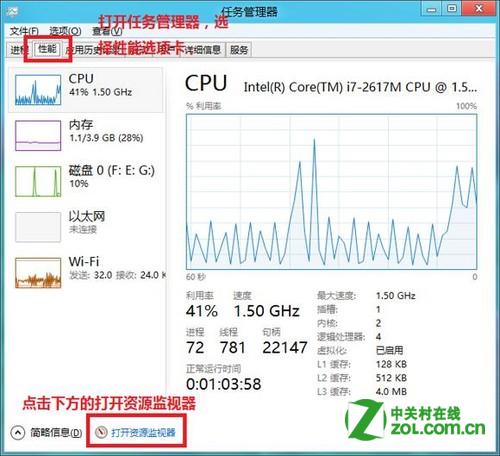
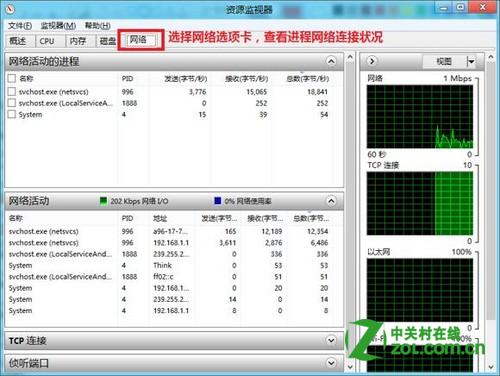
Windows 8 內建資源監視器可即時顯示每個程序的網路活動(連線位址、傳輸量、封包數),比工作管理員更詳細。兩步驟快速開啟:
Win8 桌面圖標出現小黃鎖?修改桌面文件夾權限添加 Users 組解決
Win8 查看無線網路流量使用情況
Windows 8 移除內建微軟拼音輸入法巧法:新增第三方輸入法後刪除預設輸入法不影響系統區域語言
Windows 8 管理員帳戶設置完整教程:啟用內建 Administrator 與提升標準帳戶權限
Windows 8 平板鍵盤中英文 @ 符號陷阱:全形/半形輸入差異導致登入失敗
Win8/8.1/10/11開啟「執行」對話框:Win+R通用熱鍵與右鍵開始選單兩種方法
將 Win8 系統安裝到 USB 儲存裝置 (Windows To Go) 完整教學:Win$Man 工具、16GB+ USB、可攜帶系統
Win8 中英文輸入法切換與自訂熱鍵設定