Windows 8 安裝方式多樣,使用 USB 隨身碟啟動 WinPE 安裝最通用、成功率最高 (近 100%),適用任何支援 USB 開機的電腦 (含新購筆記本、已裝其他系統電腦)。
三大核心步驟
- 製作 WinPE 啟動 USB: 使用通用 PE 工具箱 3.0 或天意 USB 維護系統,隨身碟插入電腦執行工具按提示製作。
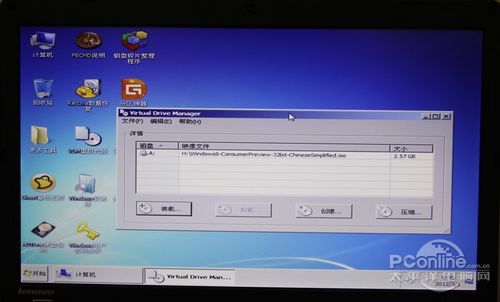
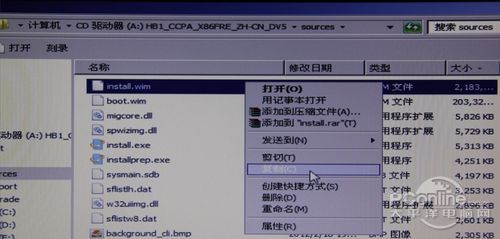
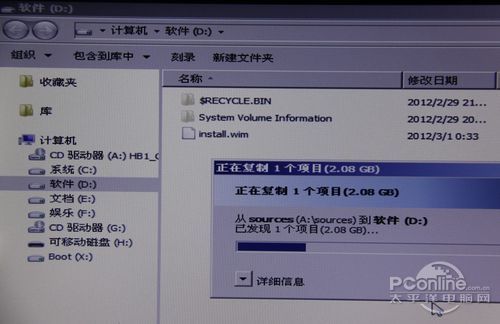
- 提取 install.wim 至 D 槽: 在 WinPE 環境下用 VDM 虛擬光碟機掛載 Windows 8 ISO,將
Sources\install.wim (約 2.08GB, 32位版) 複製到 D 槽根目錄 (直接掛載安裝易出錯,落地較穩妥)。
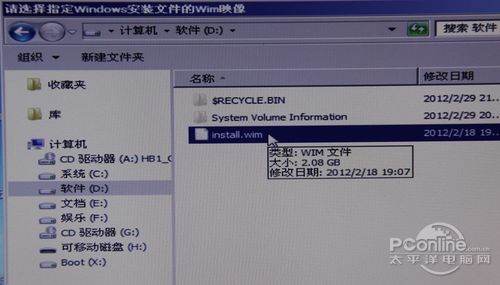
- 使用 Win$Man 安裝: 執行 Win$Man,選擇 D 槽 install.wim → 選擇「Windows 8 Customer Preview」版本 → 開始安裝。
完成上述步驟後重新開機等待安裝完成即可。教學圖文詳盡,初學者可逐步跟著操作。