升級 Win8.1 後無線網路「受限」無法上網,或頻繁掉線不穩定。
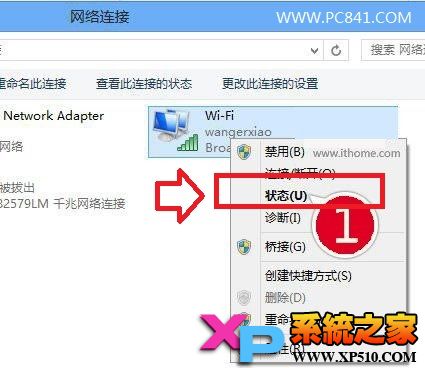
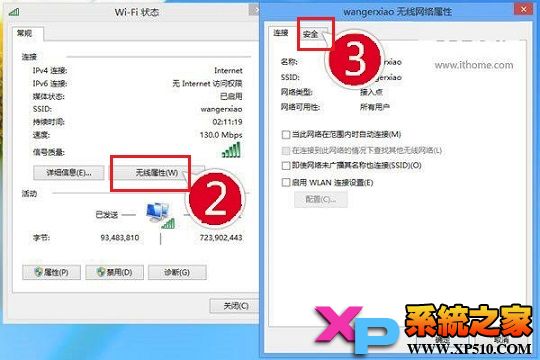
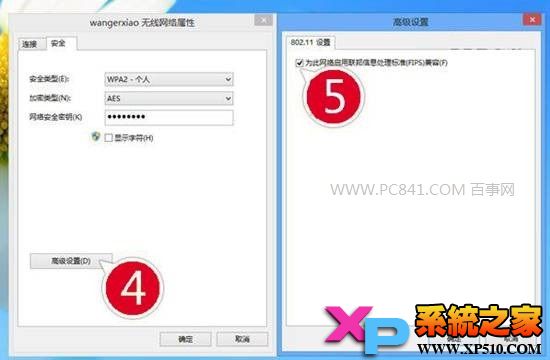
若仍不穩,嘗試更新無線網卡驅動至最新版。
Windows 8.1 預覽版無法解除安裝:官方說明與還原方案
Win8 開始畫面加入桌面程式捷徑:右鍵「釘選到開始畫面」三步驟
Win8.1 Update 1 補丁離線安裝順序與版本差異完整說明(KB2919442 為先決條件)
Win8 玩《魔獸世界》報錯 BLZPTS00008?清理 C 盤空間、結束衝突進程、刪除 Battle.net 資料夾、磁碟掃描、關閉防火牆
微軟延長 Windows 8.1 Update 強制升級寬限期至 6 月 10 日
Win8.1 系統字體模糊不清?啟用 ClearType 微調文字銳利度