控制台「新增/移除程式」開啟即自動關閉,無法卸載軟體。
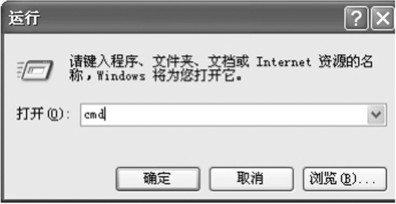
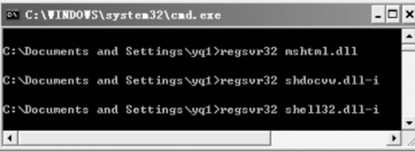
主要因註冊表安裝程式相關資料遺失。以管理員身分開啟 CMD,依序執行:
regsvr32 mshtml.dll
regsvr32 shdocvw.dll -i
完成後關閉 CMD,「新增/移除程式」即可恢復正常。
Windows 8 設定自動登入並直接進入開始畫面:本機用戶和群組 + control userpasswords2 兩階段設定
Windows 8 Metro 版 QQ 聯絡人卡死解決方案
Win8 版阿里旺旺評測:Metro 風格、交易查詢、商品連結預覽
Windows 8 平板試用體驗:顛覆傳統模式、雲端優先、人人可編程、不再臃腫
Win8 建立 Wi-Fi 熱點完整教學:netsh 指令啟用託管網路並共用網際網路
Win8清除遠端桌面連線歷史記錄:登錄、Default.rdp、工作列釘選三步驟
Windows 8 顯示檔案副檔名並修改:控制台資料夾選項取消隱藏已知類型副檔名
Win8 安裝 QQ 提示「偵測到 TM 正在執行」?關閉工作管理員即可解決