Windows遠端桌面連線(mstsc)會記錄連線過的電腦名稱/IP,殘留在登錄、使用者資料夾與工作列釘選清單中。本文提供完整清除步驟保護隱私。
regedit → 瀏覽至 HKEY_CURRENT_USER\Software\Microsoft\Terminal Server Client\Default → 刪除 MRU* 系列值(資料為連線記錄的電腦名/IP)。%USERPROFILE%\Documents(或「文件」資料夾) → 刪除隱藏檔 Default.rdp。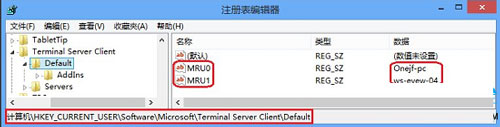
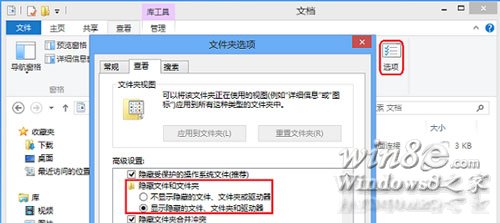
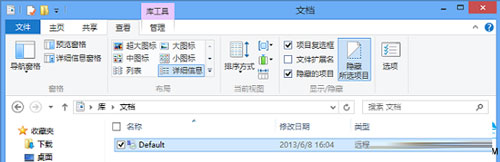
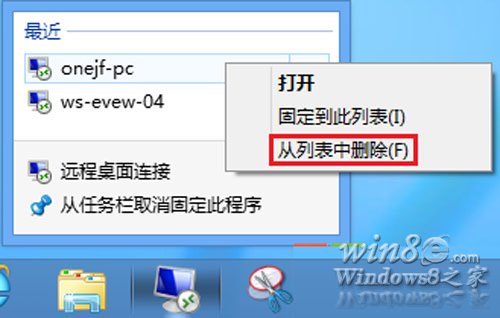
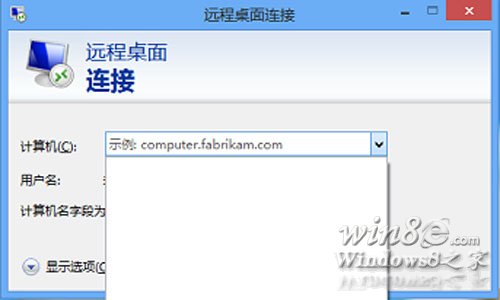
Win+R輸入 mstsc 開啟遠端桌面連線,「電腦」下拉清單應為空白或僅剩手動輸入的記錄。
Remove-ItemProperty -Path "HKCU:\Software\Microsoft\Terminal Server Client\Default" -Name "MRU*" -ErrorAction SilentlyContinue
Remove-Item "$env:USERPROFILE\Documents\Default.rdp" -ErrorAction SilentlyContinue
# 工作列釘選需手動操作或操作Shell链接文件
%USERPROFILE%\Documents。定期清理遠端連線記錄,避免敏感伺服器位址外洩,符合資安最佳實務。