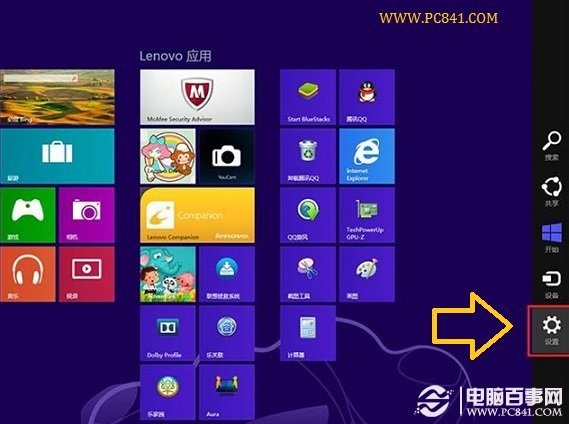
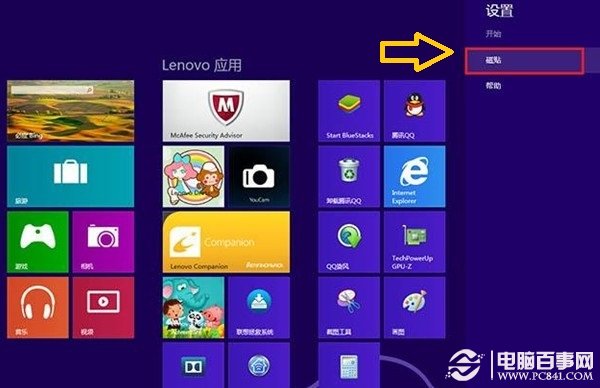
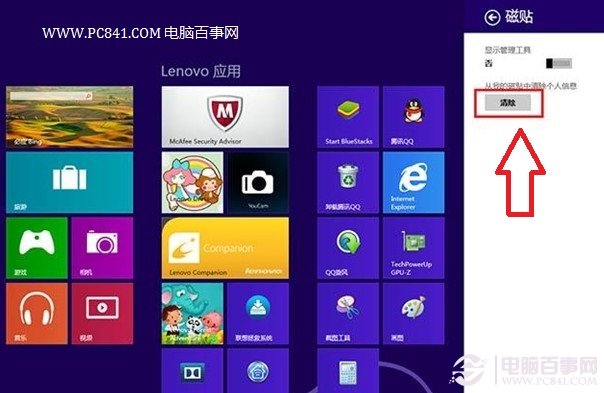
開始畫面動態磚會即時顯示微博、相片、內容等資訊,方便之餘可能洩露隱私。清除快取可移除磚上殘留的圖片與資料。
Win 8.1 更改螢幕解析度兩種方法圖解
快速掌握 Win8 常用觸控手勢操作
Windows 8 開發者預覽版無法安裝 QQ 解決辦法:關閉工作管理員
Win8.1 修改 CPU 名稱教學:在工作管理員顯示自訂處理器資訊
Win8 新增虛擬網卡啟用承載網路圖文教學
Windows 8 查看元件服務:控制台管理工具三步驟開啟
Windows 8.1 不啟用能用多久?試用 30 天,最多重裝延長至 90 天
Windows 8.1 開始按鈕回歸意義分析:只是跳轉開始畫面的捷徑?