Windows XP Windows 7 Windows 2003 Windows Vista Windows 綜合教學 Linux 系統教學
Windows 10 Windows 8 Windows 2008 Windows NT Windows Server 電腦軟體教學

Win8 IE10/11無法播放Flash內容?完整排查與修復指南

編輯:Windows 8 系統介紹

Windows 8內建IE10/11分為「桌面版」與「Modern/Metro版」兩種模式。Modern版預設僅支援微軟相容性檢視清單(CV清單)內的網站播放Flash,其他網站會被封鎖。本文提供完整排查步驟恢復Flash播放功能。

現象分類

  • 桌面版也無法播放:Flash Player未啟用、版本過舊、ActiveX篩選封鎖。
  • 僅Modern版無法播放:網站不在CV清單、需啟用CV清單自動更新。

排查步驟

1. 確認桌面版能否播放

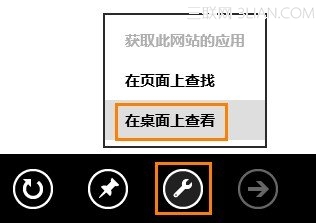
Modern版IE右滑/右鍵 → 選單列「工具」 → 「在桌面上檢視」 → 測試Flash內容。
2. 桌面版也無法播放 → 修復桌面版Flash

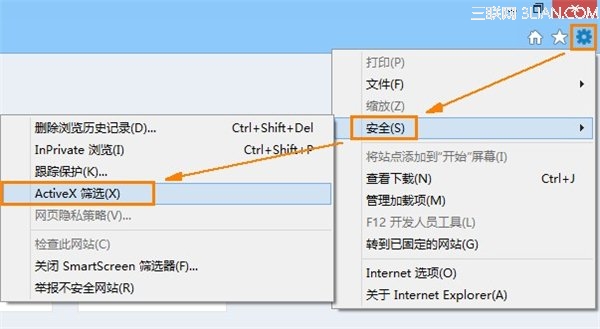
  • 停用ActiveX篩選:桌面版IE → 「工具」→「安全性」→ 取消勾選「ActiveX篩選」 → 重啟IE。
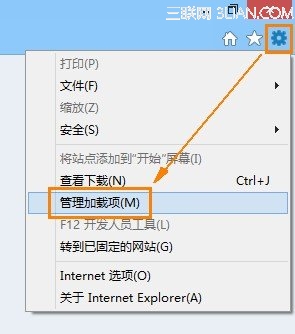
  • 啟用Flash Player附加元件:「工具」→「管理附加元件」→ 找到「Shockwave Flash Object」 → 點「啟用」。
  • 更新Flash Player:Win8/8.1 Flash內建於IE,透過Windows Update更新(選擇性更新中勾選Flash更新),或至Adobe官網下載「IE專用版」安裝。

3. 僅Modern版無法播放 → 啟用CV清單更新

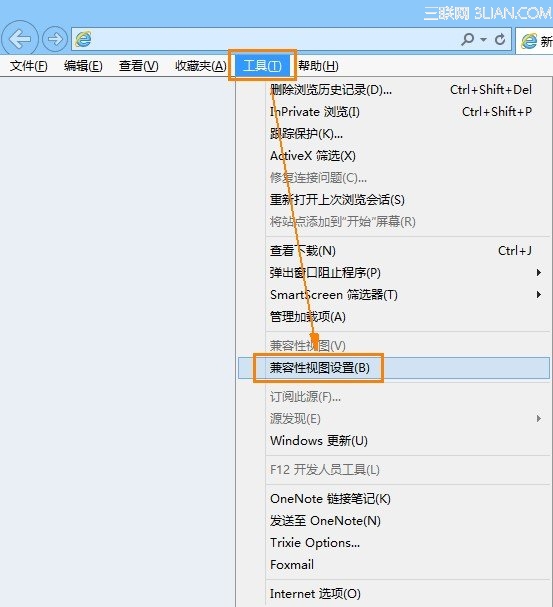
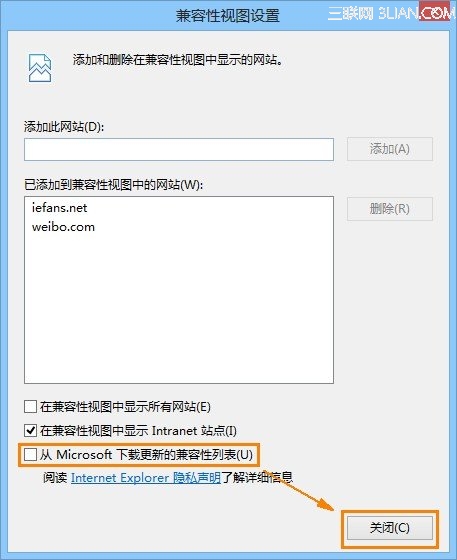
  • 桌面版IE → 「工具」→「相容性檢視設定」→ 勾選「從 Microsoft 下載更新的相容性清單」 → 關閉。
  • 重啟Modern版IE,CV清單將自動更新,支援更多網站Flash播放。

重要提醒

  • Adobe Flash Player已於2020年12月31日停止支援,現代瀏覽器(Edge、Chrome、Firefox)均已移除Flash支援。
  • Windows Update已推送KB4577586移除Flash Player元件,建議確認已安裝此更新以修補安全性漏洞。
  • 若仍有舊版系統需求,建議使用隔離虛擬機運行,勿連接生產網路。

本文保留歷史技術文檔價值,現代環境請全面棄用Flash改用HTML5/Web標準技術。

Copyright © Windows教程網 All Rights Reserved