Windows XP Windows 7 Windows 2003 Windows Vista Windows 綜合教學 Linux 系統教學
Windows 10 Windows 8 Windows 2008 Windows NT Windows Server 電腦軟體教學

Win8 區域網路 Proxy 伺服器設定:IE 介面與系統級生效

編輯:Windows 8 系統介紹

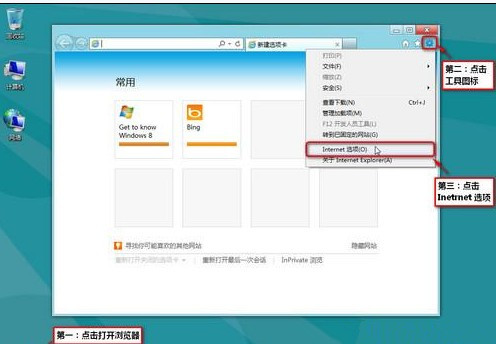
Windows 8 透過 IE 介面設定 LAN Proxy,設定即時生效於系統層級 (含 Metro 應用程式):

設定步驟

  1. 開啟 IE → 右上角工具圖示 → 「網際網路選項」。
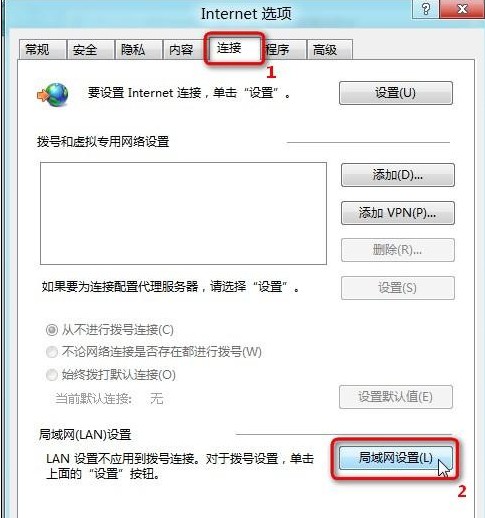
  2. 「連線」索引標籤 → 「區域網路 (LAN) 設定」。
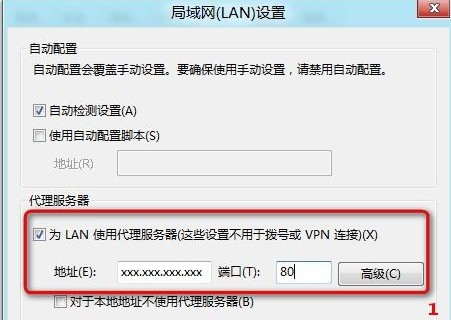
  3. 勾選「為 LAN 使用 Proxy 伺服器 (這些設定不適用於撥號或 VPN 連線)」。
  4. 輸入 Proxy 位址與連接埠 (如 192.168.1.100:8080) → 「確定」。
  5. 「網際網路選項」→ 「確定」即時生效。

進階:「進階」按鈕可分別設定 HTTP、HTTPS、FTP、SOCKS 不同 Proxy 伺服器;「例外狀況」可輸入不使用 Proxy 的位址 (如 192.168.*; *.local; localhost)。系統級 Proxy 設定亦可透過 netsh winhttp set proxy 指令管理,適用無介面環境。

Copyright © Windows教程網 All Rights Reserved