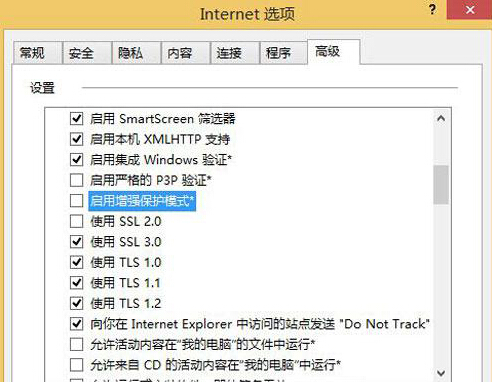
IE11 在 Windows 8 上若無法開啟新分頁、連結點擊無反應,多為「增強保護模式」 (EPM) 導致相容性衝突。關閉此功能即可恢復正常分頁操作。
關閉 EPM 後分頁功能恢復正常,安全性略有降低,但對一般瀏覽影響不大。若需高安全環境,建議改用現代瀏覽器 (Edge/Chrome/Firefox)。
Windows 8 四大關鍵功能:跨裝置運行、速度更快、應用商店、Metro 代表未來
Windows 8 免安裝媒體實現系統重新整理與重設完整教學
Win8 字體安裝正確姿勢:控制面板 → 字體資料夾 → 複製 .ttf/.fon 文件自動安裝
Win8 快速尋找應用程式:開始畫面右鍵「所有應用程式」/ 滑鼠右下角搜尋
Windows 8 印表機共用設定完整教學:主機端設定與用戶端連線步驟
Windows 8 系統 15 大使用技巧全攻略:關機、多任務、搜尋、Charms、IE、虛擬化、MSE 等
Win8 解決安全中心服務無法啟動:三大方案排查衝突軟體
Win8 SkyDrive 上傳與建立文件完整教學