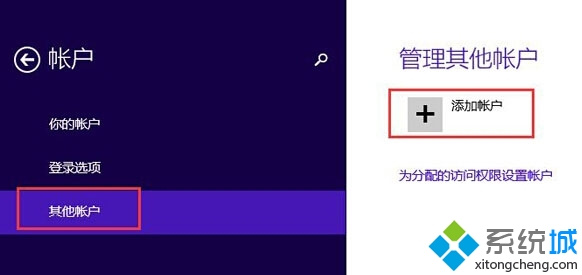
嘗試將本地帳戶切換為 Microsoft 帳戶時遭遇「無法連線」錯誤,通常是帳戶同步服務暫時異常。最快解法是在「其他帳戶」中直接新增該 Microsoft 帳戶作為新使用者,再以新帳戶登入。
此法等同於建立新使用者設定檔,原本地帳戶資料需手動遷移 (如桌面、文件資料夾),但能立即解決無法切換的問題。
Win8 系統如何禁用電源鍵功能,避免誤觸關機
Win8 執行 explorer.exe 報錯 0xc0000018?登錄檔刪除 IFEO 項目修復
Win8/8.1 關閉 Modern 鎖定畫面 (群組原則法)
Win8 內建「數學輸入面板」:手寫輸入複雜公式,論文寫作神器
Windows 8.1 找回傳統開始選單完整指南:手動建立工具列與 Classic Shell 兩大方案
Win8 開啟工作管理器的 5 種快捷方式,當機也能強制結束程序
Windows 8 安裝方式三選一利弊全分析:覆蓋安裝、雙系統、虛擬機各適合誰?
Win8 硬碟安裝關鍵:必須用 source/setup.exe 而非根目錄 setup.exe