Windows 8/8.1 預設開機/喚醒顯示 Modern 鎖定畫面,可透過本機群組原則永久關閉,直接進入登入畫面。
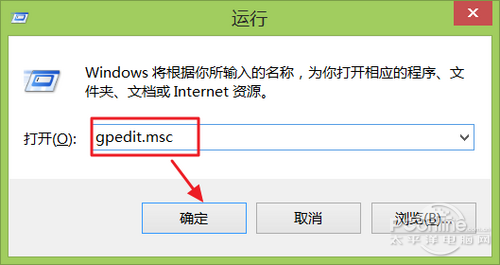
gpedit.msc 開啟本機群組原則編輯器。
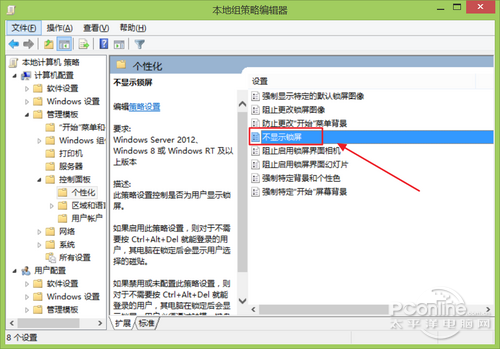
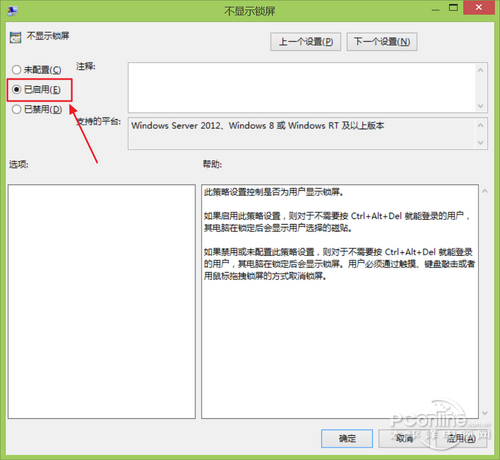
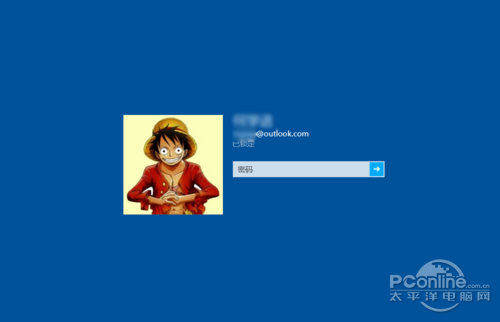
同路徑將「不顯示鎖定畫面」改為「未設定」或「已停用」即可恢復 Modern 鎖定畫面。
注意:僅專業版/企業版支援 gpedit.msc;核心版請使用登錄法 (NoLockScreen=1)。
Windows 8 RP 程式碼現蹤象暗示將相容 Windows Phone 應用
Windows 8.1 一鍵移除預裝應用神器:Windows 8 App Remover 圖形化介面批量刪除
Windows 8.1 取得最高權限完整教學:解決刪除檔案「權限不足」
Windows 8 系統檔案損壞無法自動修復:DISM 掃描/檢查/還原健康狀態三步驟
微軟 BUILD 大會即將發布 Windows 8 Build 8100?多方猜測版本號
《憤怒鳥:星戰版》Windows 8 版終於更新:補齊 Hoth 關卡、新增 Cloud City 與 Boba Fett Missions