Win 8 更新 Firefox 導致 IE 無法開啟,修復:
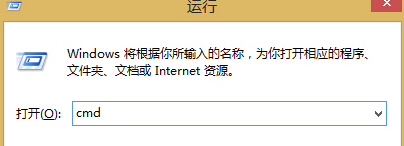
cmd
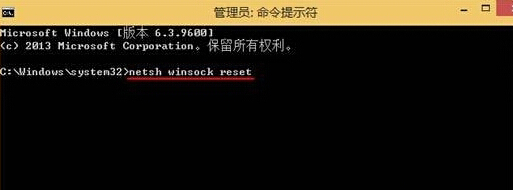
netsh winsock reset
Winsock 目錄損毀會影響 IE 網路元件,重置即可修復。
Win8 預覽版 IE10 內建 Flash Player 損壞無法重裝?從 Win7 複製檔案修復
Win8 超極筆三大關機小妙招:電源鍵、邊緣滑動、Alt+F4 選單
Win8 系統加速優化六大絕招:清理 Windows.old、關閉 IPv6/Defender/視覺特效/碎片整理、建立快速關機捷徑
Windows 8 清除搜尋記錄完整教學:超級搜尋與檔案總管雙管齊下
Win8 尋找應用程式兩大方法:所有應用程式檢視與即時搜尋
鮮為人知的 Win8 檔案備份新方式:檔案歷程記錄詳解
Win8/8.1/10/11顯示副檔名:檔案總管功能區一鍵設定
探索 Win8 隱藏功能:右鍵開始按鈕選單與檔案歷程記錄自動備份