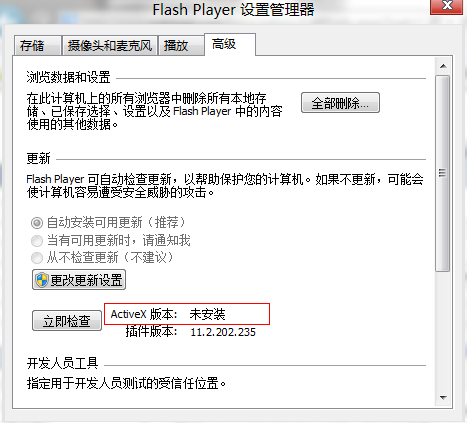
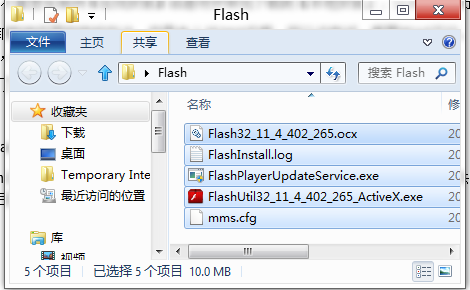
Win8 預覽版 IE10 內建 Flash Player,官網安裝程式會偵測到現有版本而拒絕安裝。若內建元件損壞導致無法播放 Flash,可從正常運行的 Win7/Win8 機器複製檔案修復。
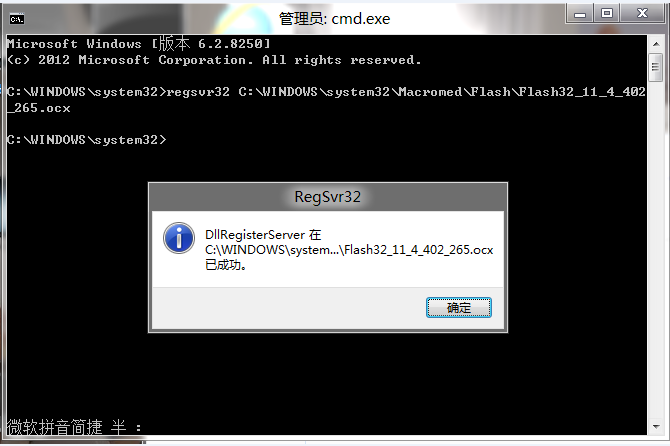
regsvr32 C:\Windows\System32\Macromed\Flash\Flash32_11_4_402_265.ocx
原理: 繞過安裝程式版本檢查,直接替換損壞二進位檔並重新註冊 COM 元件,恢復 IE10 Flash 播放能力。
Windows 8:脫離硬體的虛擬化作業系統——DaaS 架構願景
Windows 8 原生支援 VHD 虛擬硬碟一鍵掛載教學
保護隱私:三招快速清除 Win8 動態磚貼個人資訊
應用程式商店升級 Win8.1 失敗?wsreset 指令清除快取即可解決
Win8/8.1 緊急重啟三步走:Ctrl+Alt+Del + 按住 Ctrl 點電源鍵
微軟測試 Windows 8 下的 Ribbon UI:色彩與按鈕風格全新設計
Windows 8.1 螢幕截圖四大技巧:Print Screen、Win+Print Screen、QQ 截圖、繪圖工具
Win8 休眠後快速恢復的關鍵:Modern 應用暫停與記憶體回收機制