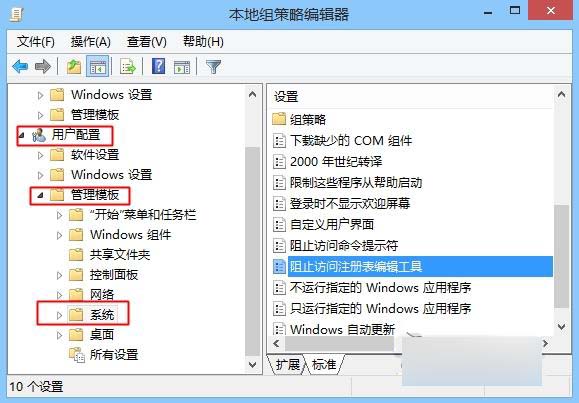
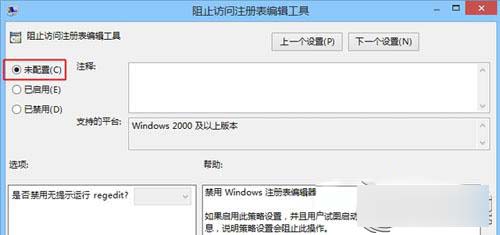
Win 8 無法開啟 regedit 提示被管理員停用,解決:
regedit
gpedit.msc
設定生效後即可正常開啟登錄編輯器。
Win8 設定預設瀏覽器:控制台「預設程式」三步走,支援 Chrome/Firefox/Edge 任選
Win 7 硬碟圖示無法顯示?快速修復圖示快取與 autorun.inf 完整指南
Win8 開啟資料夾卡頓假死原因:Windows Defender 即時掃描導致
Win8 電腦管理工具完整功能介紹與開啟方式
Windows 8 語音辨識功能啟用與設定入口完整指引
微軟 CES 確認:商業版 Windows 8 目標 10 月推出,下一里程碑 2 月底 Consumer Preview
Windows 8 調整視覺效果提升效能:自訂動畫、陰影、平滑字體邊緣
Win8 IE11 開啟「快取與資料庫」加速網頁載入?Internet 選項→瀏覽記錄→設定→快取與資料庫