Windows XP Windows 7 Windows 2003 Windows Vista Windows 綜合教學 Linux 系統教學
Windows 10 Windows 8 Windows 2008 Windows NT Windows Server 電腦軟體教學

Win7 登入畫面背景自訂教學:免修改系統檔,安全又簡單

編輯:Win7 系統基礎知識

XP/Vista 時代要更換登入背景需用 Resource Hacker 修改 LogonUI.exe,風險高且繁瑣。Windows 7 內建支援自訂登入背景,操作安全許多。

步驟 1:修改登錄啟用 OEM 背景

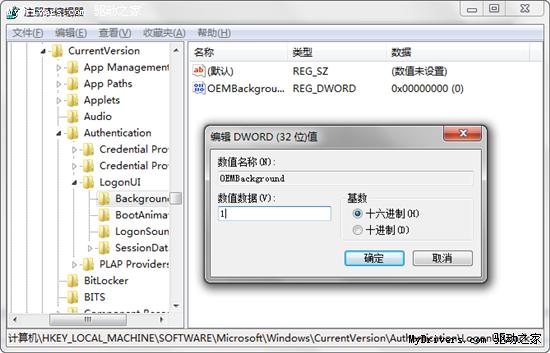
  1. 執行 regedit,定位至 HKEY_LOCAL_MACHINE\SOFTWARE\Microsoft\Windows\CurrentVersion\Authentication\LogonUI\Background
  2. 找到或新建 DWORD 值 OEMBackground,設為 1

修改 OEMBackground 登錄值

修改登錄數值

步驟 2:放置背景圖片

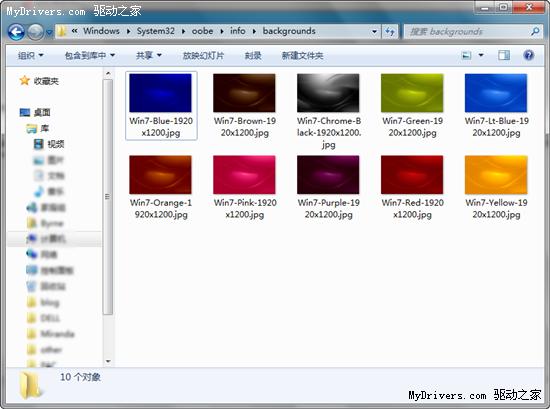
  1. 進入 C:\Windows\System32\oobe,建立資料夾 info\backgrounds
  2. 準備一張 1024×768 像素、JPG 格式、小於 250 KB 的圖片,命名為 backgroundDefault.jpg 放入上述資料夾

背景圖片放置路徑

將製作好的照片複製到此資料夾

登出或重開機即可看到新背景。若圖片超過 250 KB 將無法顯示,請壓縮後再試。

Copyright © Windows教程網 All Rights Reserved