執行 Windows Update 時彈出「錯誤代碼 8024402F」,代表用戶端無法連線至更新伺服器。常見原因包含網路擁塞、第三方安全軟體攔截、系統加密服務異常。本文提供分級排查方案。
sfc /scannow(注意 sfc 後有空格)按 Enter,靜待掃描修復完成(可能需數分鐘)。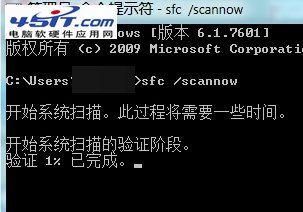
若上述無效,以系統管理員身分依序執行以下指令:
net stop wuauserv
net stop bits
net stop cryptsvc
ren %systemroot%\SoftwareDistribution SoftwareDistribution.old
ren %systemroot%\system32\catroot2 catroot2.old
net start wuauserv
net start bits
net start cryptsvc
完成後重啟電腦再試更新。
提示: 若環境為企業網路,請確認 WSUS 伺服器設定正確、防火牆允許連線 *.windowsupdate.com、*.update.microsoft.com、*.download.windowsupdate.com。