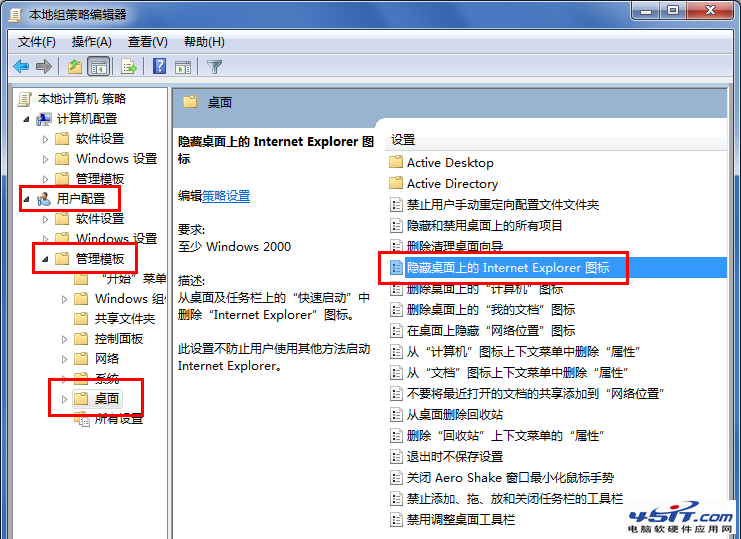
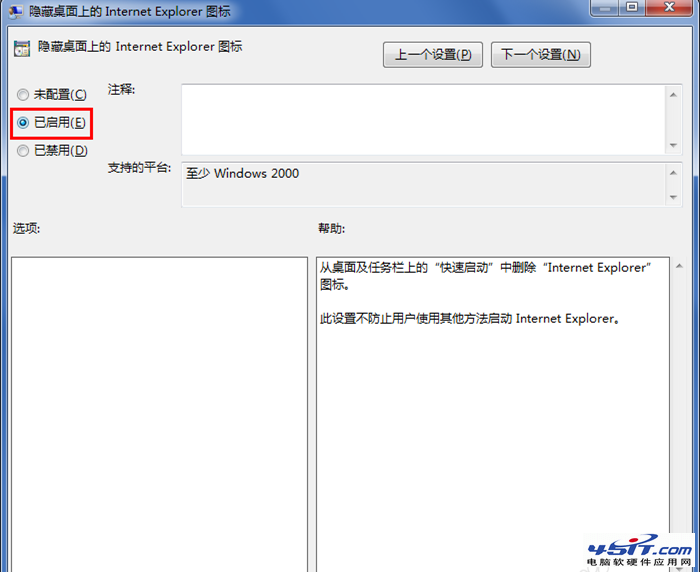
Win7 桌面上的 IE 圖示右鍵沒有「刪除」選項,只能停用?其實透過群組原則編輯器即可輕鬆隱藏,不影響系統其他功能,適合不想看到 IE 圖示的用戶。
gpedit.msc
HKEY_CURRENT_USER\Software\Microsoft\Windows\CurrentVersion\Policies\NonEnum
{871C5380-42A0-1069-A2EA-08002B30309D}
關閉 Windows 7 視窗智慧對齊 (Aero Snap) 功能:註冊表修改 WindowArrangementActive
TrustedInstaller 權限揭密:Win 7 最高管理權限取得方法(手動與工具法)
善用 Windows 7 內建「問題步驟記錄器」輕鬆錄製操作步驟,快速解決系統問題
Windows 7 使用者不可錯過的 77 項小知識(二):VDI、DirectAccess、DISM、疑難解答、可靠性監視器、多樣化部署、截圖工具、投影模式、Win+Home、Ctrl+Shift 點擊以管理員啟動、USB 安裝、一鍵燒錄、還原點預覽、同步時區、UAC 四等級
iYogi 調查:Windows 7 升級問題佔 31% 成最大痛點
Win7 正版序號安裝出現 0XC004F061 錯誤解決方法
Windows 7 系統托盤顯示星期幾:調整日期格式或用小工具 KClock 完美解決
Windows 7 睡眠模式大全(三):離開模式實現低耗下載