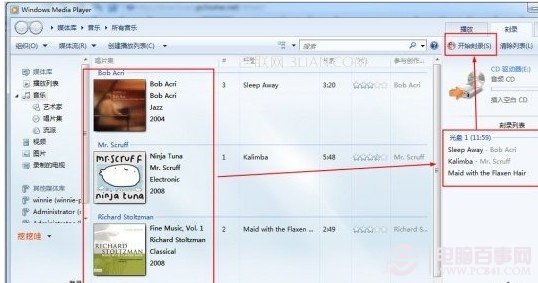
Win7 內建 Windows Media Player 12 支援直接燒錄資料光碟與音樂 CD,完全免安裝 Nero 等第三方軟體。
系統安裝映像(ISO)燒錄請用「Windows 燒錄光碟映像」功能(右鍵 ISO 選「燒錄光碟映像」)。
Windows 7 遊戲網路延遲優化實戰(二):QoS 原則與 MMCSS 服務停用
Windows 7 試用心得:介面酷、任務列優化、相容性佳、驅動豐富、網銀問題待解
Win7 三大內建電源計畫深度解析:平衡、省電、高效能 + 自訂進階技巧
移動 Winsxs 資料夾讓 Windows 7 系統碟瘦身加速
Win7 開機異常修復:啟動修復功能解決無法進入系統問題
Windows 7 升級風險與收益深度分析:為何不必等 SP1 即可部署
告別光碟機:USB 隨身碟安裝 Windows 7 完整圖文教學(官方工具 Windows 7 USB/DVD Download Tool)
系統使用技巧:一鍵備份壓縮並關機,下班零負擔