Win7 裝上更新 KB3133977 後開機變磚(卡 Logo/藍畫面),主因該更新強制啟用 Secure Boot,但 Win7 不支援此技術,衝突導致無法開機。現象多見於華碩主板,解法:進 BIOS 將 OS Type 從「Windows UEFI mode」改為「Other OS」。
修復步驟
- 開機連按 Del/F2 進 BIOS → 進階模式 → 「啟動」→「安全啟動」。
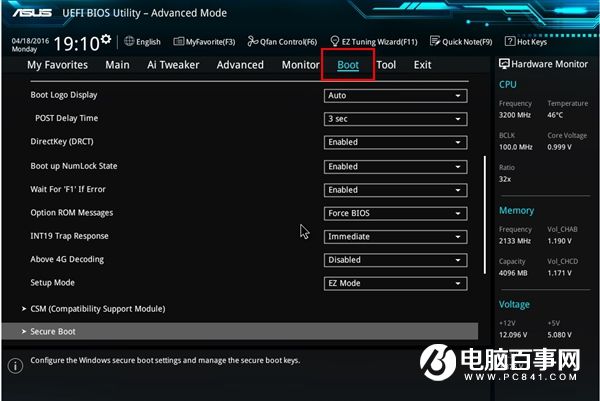
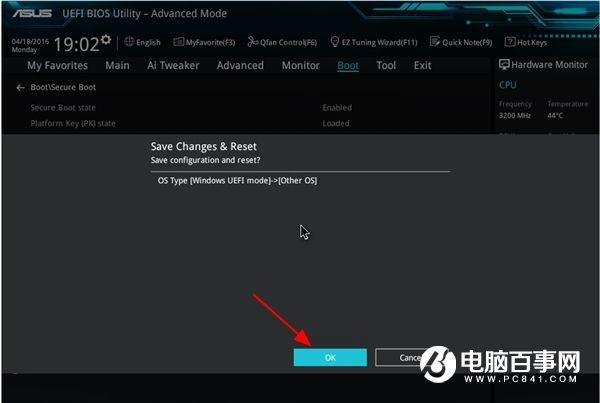
- OS Type 下拉選單選 Other OS → 存檔離開(F10 → Yes)。
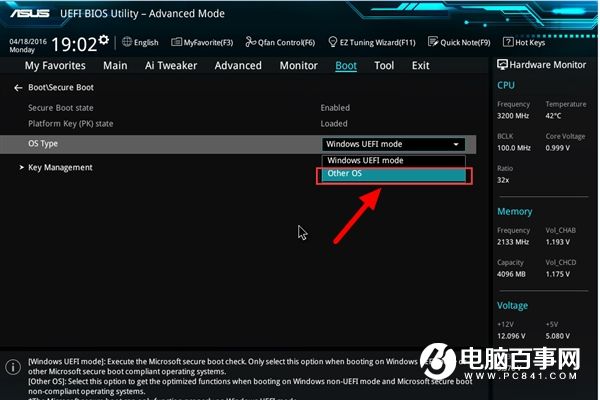
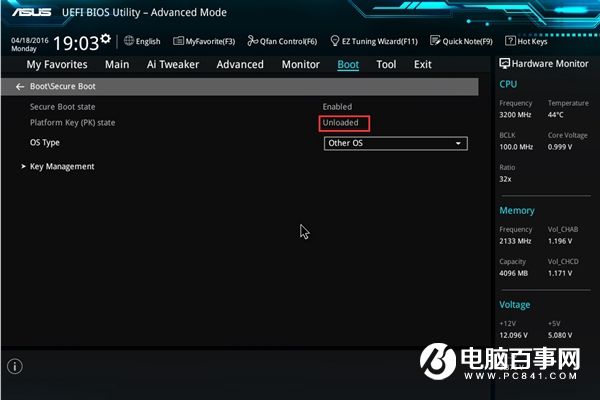
- 再次進 BIOS 確認「Platform Key」狀態為「Unloaded(未載入)」。
- 重開機進入系統,故障排除。
預防建議
- Win7 用戶暫勿安裝 KB3133977,隱藏該更新。
- 非華碩主板雖未大量回報,建議同步檢查 Secure Boot 設定。
一鍵關閉 Secure Boot,救回被更新「磚」掉的 Win7,避免重灌之苦。