Win 7 僅支援銳捷 3.xx 版本,且必須以「相容模式」+「管理員身分」執行。
8021x.exe → 內容 → 「相容性」頁籤。RuijIESupplicant.exe 重複相同設定。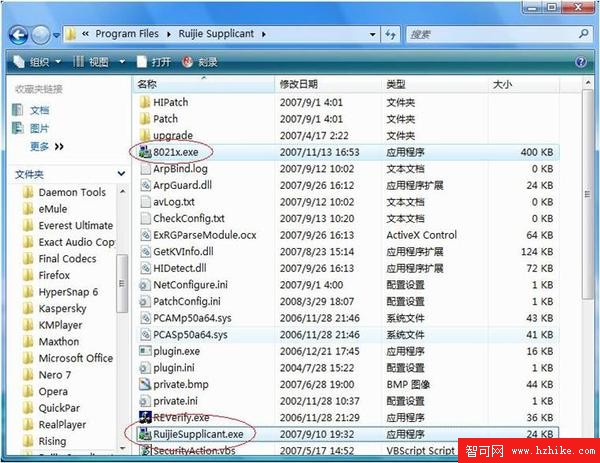
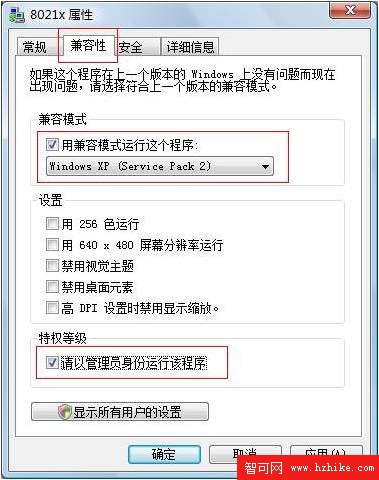
若仍無法運行,將安裝目錄下 PCAMp50a64.sys、PCASP50a64.sys 複製至 C:\Windows\System32\drivers。
安裝時亦建議以「管理員身分」執行安裝程式。
Windows 7 裝置驅動程式管理深度解析:驅動存儲、簽章驗證、疑難排解與 Device Stage
Windows 7 安裝 Microsoft Loopback Adapter (回環介面卡) 完整教學
Windows 7 內建燒錄功能全攻略:ISO 映像與音樂光碟一鍵完成
Win7 寬帶上網加速:調大 TCP 接收視窗 (GlobalMaxTcpWindowSize) 實測
微軟 2009 年 10 月安全公告彙總:Windows 與 Office 多項嚴重漏洞修補
手機電腦連上 WiFi 卻上不了網?分步排查網路故障完整指南