Windows XP Windows 7 Windows 2003 Windows Vista Windows 綜合教學 Linux 系統教學
Windows 10 Windows 8 Windows 2008 Windows NT Windows Server 電腦軟體教學

解決 Windows 7 Build 7057 開機自動彈出記事本問題

編輯:Win7 系統基礎知識

問題現象

安裝 Windows 7 Build 7057 後,每次開機或重新啟動,系統會自動開啟一個記事本,內容顯示 [.ShellClassInfo] 及 LocalizedResourceName 相關資訊。

根本原因

此為該版本已知 Bug:desktop.ini 系統檔案被錯誤放置於啟動資料夾中。

解決步驟

  1. 開啟「檔案總管」→「組織」→「資料夾及搜尋選項」→「檢視」頁籤,勾選「顯示隱藏的檔案、資料夾及磁碟機」與「取消勾選隱藏受保護的作業系統檔案」。
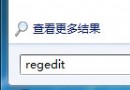
  2. 前往 C:\ProgramData\Microsoft\Windows\Start Menu\Programs\Startup,或在「開始」搜尋列輸入 shell:startup 直接開啟該資料夾。
  3. 刪除其中的 desktop.ini 檔案,重新開機即可解決。
Copyright © Windows教程網 All Rights Reserved