Win7 英文版安裝中文遊戲/軟體出現亂碼,雖在「地區與語言」設為簡體中文仍無效。修改登錄檔 HKEY_CURRENT_USER\Control Panel\International 下 Locale 值為 00000804 (簡體中文 LCID),重開機即可徹底解決非 Unicode 程式中文亂碼問題。
regedit 開啟登錄編輯器。HKEY_CURRENT_USER\Control Panel\International。Locale 數值資料改為 00000804。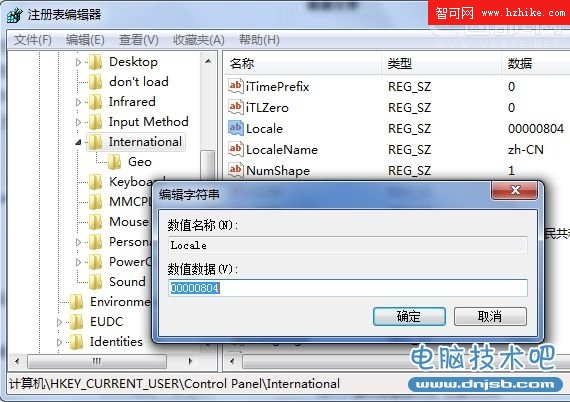
修改 Locale 值為 00000804 (簡體中文)
此法針對非 Unicode 程式 (舊版中文軟體/遊戲) 在英文版 Windows 上的顯示亂碼,屬終極解法。