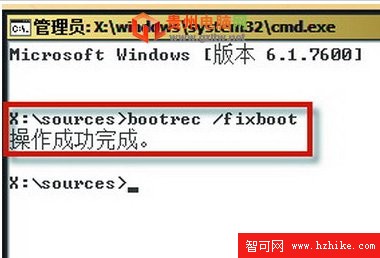
部分 Ghost 版本安裝時強制修改 MBR 加入自家啟動選單,若與 Win7 不相容會導致開機卡在「press F11 start to system restore」畫面。使用 Win7 安裝光碟內建 bootrec.exe 修復 MBR 即可恢復正常啟動。
bootrec.exe
bootrec /fixmbr
執行 bootrec /fixmbr 修復主開機記錄
此法同樣適用於解決其他第三方啟動管理器殘留導致的開機異常。
自力修復 Windows 7 消失的語言列:匯入登錄檔或執行 ctfmon.exe
Win 7 網路位置被鎖定為「公用網路」無法變更?微軟官方 Fix-it 與手動修復雙方案
Windows 7 文件救援術:善用「以前的版本」找回誤刪資料
筆記本 Win7 遊戲無法全螢幕?四大顯晶片廠商解決方案:登錄/ATI/NVIDIA/Intel 設定全覆蓋
筆電拆裝注意事項與靜電防護完整清單
IE 瀏覽器四大實用新技巧:找回快速啟動、斷點續傳、鎖定選項、免工具修復
安全專家指稱 Windows 7 仍無法有效防禦惡意軟體
Windows 7 硬碟分區三種方法詳解