Windows XP Windows 7 Windows 2003 Windows Vista Windows 綜合教學 Linux 系統教學
Windows 10 Windows 8 Windows 2008 Windows NT Windows Server 電腦軟體教學

Win7 開機卡在 GRUB 畫面?三行指令進入系統 + EasyBCD 修復 MBR 根治

編輯:Win7 常見問題解答

開機時出現 grub> 提示符,通常是因為多重開機設定錯誤、誤刪系統檔案或 MBR(主開機記錄)受損導致。GRUB 是 Linux 常用的開機載入器,若不熟悉指令操作,使用者往往會無助地強制重開機。本文提供臨時進入 Windows 的指令,並教你用 EasyBCD 重寫 MBR 徹底修復。

臨時進入 Windows:三行 GRUB 指令

在 grub> 提示符下依序輸入(每行按 Enter):

find --set-root /bootmgr
chainloader /bootmgr
boot

系統即可正常啟動進入 Windows 7 桌面。但這只是暫時方案,下次開機仍會回到 GRUB。
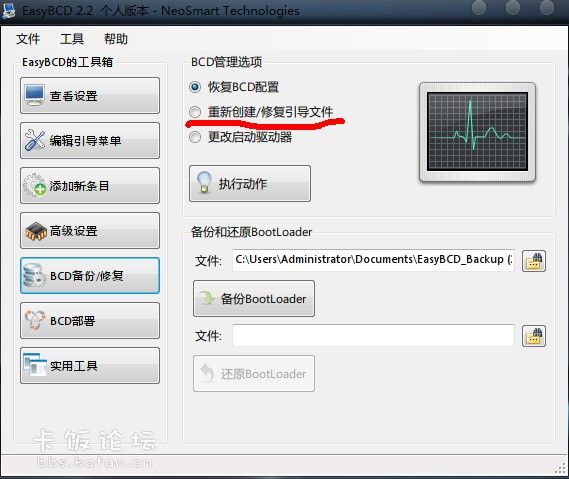
根治方案:使用 EasyBCD 重寫 MBR

  1. 進入 Windows 後,下載並安裝 EasyBCD(免費個人版)。
  2. 開啟軟體,切換到「BCD 部署」或「MBR 修復」頁籤。
  3. 選擇「寫入 MBR」或「安裝 Windows 開機載入器到 MBR」。
  4. 點擊「執行動作」/「Write MBR」,完成後重新開機驗證。
EasyBCD寫入MBR介面

補充說明

  • GRUB 常見指令:reboot(重開機)、halt(關機)、help(顯示說明)。
  • 若無法進入 Windows 下載工具,可使用 Windows 7 安裝光碟/USB 進入「修復電腦」→「命令提示字元」,執行 bootrec /fixmbr 及 bootrec /fixboot 修復。
  • EasyBCD 也可用於管理多重開機選單、新增 Linux 開機項目等進階用途。

結論:GRUB 指令可救急,重寫 MBR 才能一勞永逸。建議備份重要資料後再操作磁碟分割或多系統安裝,避免 MBR 損壞。

Copyright © Windows教程網 All Rights Reserved