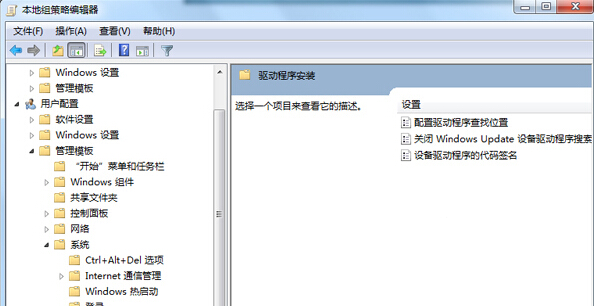
Win7 安裝新硬體預設會連線 Windows Update 搜尋驅動,耗時且可能安裝不穩定版本。群組原則啟用「設定驅動程式搜尋位置」並勾選「不搜尋 Windows Update」,強制僅使用本機驅動庫,大幅縮短安裝時間。
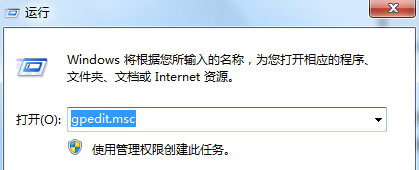
gpedit.msc
設定後插入新裝置將直接從 C:\Windows\System32\DriverStore 比對安裝,不再連網搜尋,適合離線環境或已備妥驅動的情況。
C:\Windows\System32\DriverStore
Win7 開機畫面異常(語言不符)修復指令:bcdedit 設定 locale 為 zh-CN
Windows 7 定時自動關機完整設定教學
調整 Win7 任務列預覽縮圖清晰度,註冊表一鍵搞定
Win7 拖動視窗內容消失只剩邊框?同樣是「拖動時顯示視窗內容」未勾選
Win7 啟用 MySQL 雲端服務:電腦管理 → 服務啟動 MySQL
解決 Windows 7/8 網路設定導致無法上網:重置網路介面卡快速修復
Win7 NVIDIA 顯示卡風扇異常轉速/噪音大?三大成因與對策:積塵、驅動、高負載正常行為
Win7 禁止網路搜尋驅動程式:群組原則設定「不搜尋 Windows Update」加速裝置安裝