Normal.dotm 範本檔案損毀或關聯錯誤,導致系統以 Word 圖示顯示所有捷徑/執行檔。
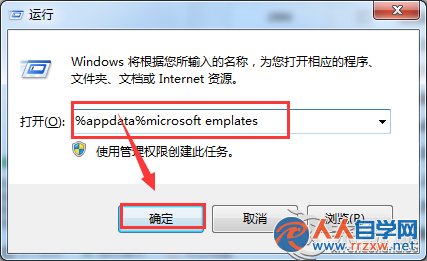
%appdata%\Microsoft\Templates
explorer.exe
Normal.dotm 是 Word 全域範本,損毀時會影響 Shell 圖示快取。刪除後 Word 會自動重建乾淨的預設範本,桌面圖示隨即恢復正常。
Win7 開始菜單建立「系統管理員命令提示字元」捷徑,一鍵以最高權限執行 CMD
Win7 藍屏代碼 0x0000001A 完整解析:記憶體管理錯誤排查與修復
Windows 7 SP1 正式版 (RTM) 64位元安裝實測圖文報告
Win7 啟用 SATA 硬碟寫入快取,提升硬碟效能的設定方法
Windows 7 修復 MSE 右鍵掃描選單遺失:匯入登錄檔恢復 Microsoft Security Essentials 整合
Win7 連線隱藏 SSID 無線網路:不廣播也能快速上網
Win7 瀏覽器右鍵選單無回應?修復瀏覽器或修改登錄檔恢復功能
Win7 完整移除印表機驅動程式:裝置與印表機介面操作圖解