雙擊 .exe 檔案無法執行、彈出「開啟方式」對話框、或以錯誤程式開啟(如記事本、壓縮軟體)。原因為登錄 HKEY_CLASSES_ROOT\exefile\shell\open\command 預設值被惡意軟體/誤操作篡改。
regedit → Enter。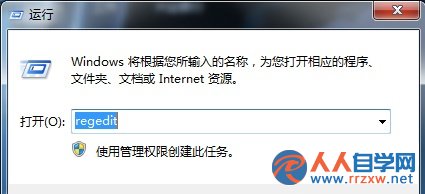
HKEY_CLASSES_ROOT\exefile\shell\open\command"%1" %*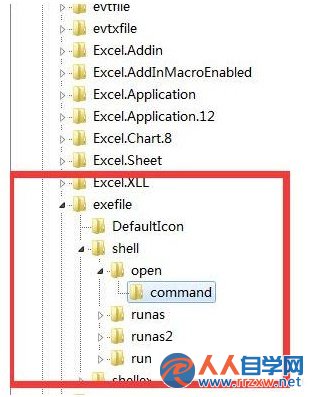
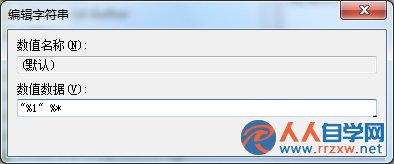
建議同步檢查並修正以下機碼預設值:
| 機碼路徑 | 正確預設值 |
|---|---|
HKEY_CLASSES_ROOT\.exe | exefile |
HKEY_CLASSES_ROOT\exefile\DefaultIcon | %1 |
HKEY_CURRENT_USER\Software\Classes\.exe | 刪除此機碼 (若存在,使用者層級覆蓋) |
HKEY_CURRENT_USER\Software\Classes\exefile\shell\open\command | 刪除此機碼 |
重新啟動電腦,或登出/重新登入,.exe 執行關聯應恢復正常。
assoc .exe=exefile
ftype exefile="%1" %*
建立 fix_exe_assoc.bat 內容如下,右鍵「以系統管理員身分執行」:
@echo off
reg add "HKCR\.exe" /ve /d "exefile" /f
reg add "HKCR\exefile\shell\open\command" /ve /d "\"%%1\" %%*" /f
reg delete "HKCU\Software\Classes\.exe" /f
reg delete "HKCU\Software\Classes\exefile" /f
assoc .exe=exefile
ftype exefile="%%1" %%*
echo 修復完成,請重新開機。
pause