Windows XP Windows 7 Windows 2003 Windows Vista Windows 綜合教學 Linux 系統教學
Windows 10 Windows 8 Windows 2008 Windows NT Windows Server 電腦軟體教學

Win7 瀏覽器網址列無法輸入文字?刪除登錄 EnableUIPI 修復

編輯:Win7 常見問題解答

IE/Edge 網址列無法輸入字元、游標不閃爍、鍵盤無反應,多為登錄 EnableUIPI 值導致 UI 權限隔離異常。

修復步驟

  1. Win+R → regedit。
  2. 瀏覽:
    HKEY_LOCAL_MACHINE\SOFTWARE\Microsoft\Windows\CurrentVersion\Policies\System
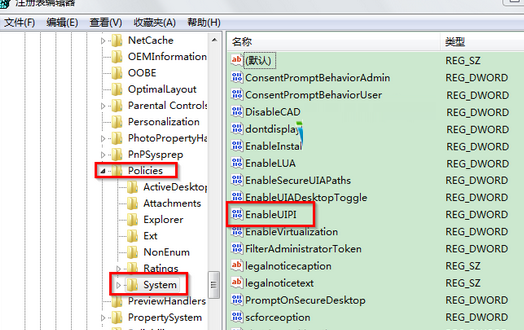
  3. 右側找到 EnableUIPI 字串值,右鍵刪除。
  4. 關閉登錄編輯器,重新開機生效。

登錄 EnableUIPI 位置

刪除後重開機

原理

  • EnableUIPI (User Interface Privilege Isolation) 控制進程完整性等級之間的 UI 互動。
  • 某些優化工具/安全軟體誤設此值為 0 或建立空值,導致中等/高完整性進程無法接收低完整性輸入(如瀏覽器網址列)。
  • 刪除該值恢復預設行為(UIPI 啟用但相容性正常),即可修復輸入問題。

延伸

  • 同樣路徑下的 FilterAdministratorToken、EnableLUA 等 UAC 相關值若被誤改,也可能引發權限異常,建議保持預設或由群組原則統一管理。

Copyright © Windows教程網 All Rights Reserved