工作列右下角輸入法圖示消失,請嘗試以下方法恢復:
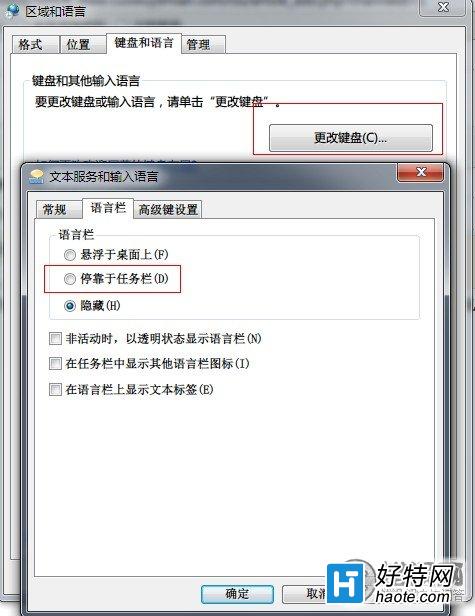
「控制台」→「地區及語言」→「鍵盤和語言」→「更改鍵盤」→「語言列」索引標籤,選擇「停駐在工作列」。
按 Win+R 輸入 ctfmon 按 Enter,即時恢復語言列程式。
新建文字檔貼上以下內容,存為 fix_input.reg 並執行:
Windows Registry Editor Version 5.00
[HKEY_CURRENT_USER\Software\Microsoft\Windows\CurrentVersion\Run]
"ctfmon.exe"="C:\\WINDOWS\\System32\\ctfmon.exe"
重開機後語言列將自動顯示。