微軟曾強制將 Win10 升級檔案靜默下載到 Win7 電腦,佔用數 GB 空間且常彈窗騷擾。若你堅持使用 Win7,可依照以下兩種方式徹底清除升級檔案,並防止再次下載。
C:\Windows\SoftwareDistribution\Download 並按 Enter。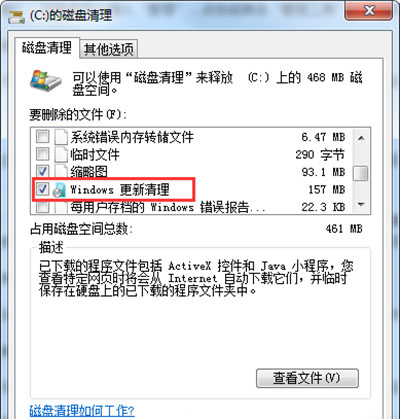
gpedit.msc →「電腦設定」→「系統管理範本」→「Windows 元件」→「Windows Update」。完成上述步驟,不僅能回收寶貴磁碟空間,也能讓 Win7 繼續安靜、穩定地服役。
Win7 SP1 更新後無法休眠/喚醒?微軟官方修復方案與手動排除步驟
老電腦玩 LOL 卡?換 Q9550 四核 + 4G 內存 + GTX 660 二手三件套,或直接換新平台
Win7 看影片收 QQ 訊息音量自動變小?關閉通訊活動偵測恢復正常
Win7 讀取 Administrator 屬性報錯怎麼辦?啟用 Server 與 Workstation 服務解決
Windows 7 限制上网时间与内容的双方案:路由器家长控制与聚生网管软件
Win7 收藏夾資料夾在哪?兩種快速找到 IE 收藏網址儲存位置的方法