Windows XP Windows 7 Windows 2003 Windows Vista Windows 綜合教學 Linux 系統教學
Windows 10 Windows 8 Windows 2008 Windows NT Windows Server 電腦軟體教學

Win7 hosts 檔案完整指南:功能原理、預設內容與編輯應用

編輯:Win7 系統應用技巧

hosts 是無副檔名的系統文字檔,作為本機 DNS 快取對應表,優先於外部 DNS 伺服器解析網域。善用它可加速存取、封鎖廣告/惡意網站、測試開發環境網域對應。
🔍 運作原理

  1. 瀏覽器輸入網址 → 系統先查詢 hosts 檔案。
  2. 找到對應 IP → 直接連線,跳過 DNS 解析。
  3. 找不到 → 轉交 DNS 伺服器遞迴查詢。
  4. 若 hosts 將域名指向 127.0.0.1 或 0.0.0.0 → 達到封鎖效果。

📂 Win7 預設 hosts 位置與內容

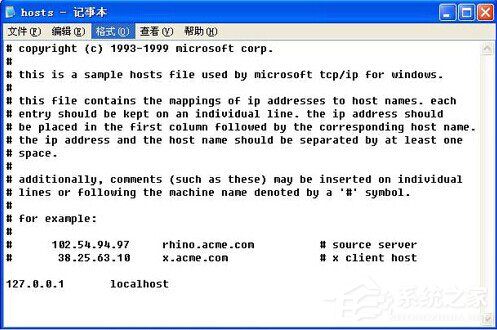
路徑: C:\Windows\System32\drivers\etc\hosts

預設內容:

# Copyright (c) 1993-2009 Microsoft Corp.
#
# This is a sample HOSTS file used by Microsoft TCP/IP for Windows.
#
# 127.0.0.1       localhost
# ::1             localhost

✏️ 編輯 hosts 檔案步驟

  1. 以系統管理員身分開啟記事本(右鍵記事本 → 以系統管理員身分執行)。
  2. 開啟檔案 → 路徑貼上 C:\Windows\System32\drivers\etc\hosts → 檔案類型選「所有檔案」 → 開啟。
  3. 在檔案末尾新增對應規則,格式:
    IP位址 域名 # 註解
    範例:
    127.0.0.1 ad.example.com # 封鎖廣告伺服器
    192.168.1.50 dev.local # 區域網開發測試
  4. 儲存檔案(Ctrl+S),無需重開機即時生效。

💡 實用應用場景

  • 封鎖廣告/追蹤:引用 StevenBlack/hosts 等社群維護清單。
  • 開發測試:本機網站對應自訂域名,免修改 DNS。
  • 加速特定網站:手動指定 CDN 節點 IP(需確認 IP 穩定)。
  • 家長控制:將不當網站導向 127.0.0.1。

⚠️ 注意事項

  • 編輯需管理員權限,否則無法儲存。
  • 部分安全軟體會鎖定 hosts,需暫時解除保護。
  • IPv6 環境請同步加入 ::1 對應。
  • 瀏覽器 DNS 快取(Chrome: chrome://net-internals/#dns)可能導致變更延遲生效,可清除快取。

Copyright © Windows教程網 All Rights Reserved