桌面出現無法刪除的「傳奇霸業」遊戲圖示,通常是瀏覽器推廣軟件殘留。利用 360 安全衛士「軟件管家」可徹底卸載並清理註冊表殘留。
操作步驟
- 安裝並開啟 360 安全衛士,點擊右下角「軟件管家」。

- 切換到「卸載」頁籤,列表中尋找「傳奇霸業」。

- 點擊右側「卸載」按鈕,靜待自動移除。
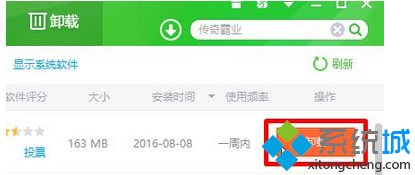
- 卸載完成若提示「發現殘留」,點擊「強力清掃」徹底刪除註冊表鍵值與殘留檔案。

替代方案
- 若 360 無法識別,可嘗試 Geek Uninstaller、Revo Uninstaller 等專業卸載工具掃描殘留。
- 手動刪除:Win+R 輸入
shell:Common Desktop 檢查公用桌面資料夾,或檢查 C:\ProgramData\Microsoft\Windows\Start Menu\Programs 啟動資料夾。