Windows XP Windows 7 Windows 2003 Windows Vista Windows 綜合教學 Linux 系統教學
Windows 10 Windows 8 Windows 2008 Windows NT Windows Server 電腦軟體教學

Win7 CMD 指令失效?修正 PATH 環境變數恢復系統指令路徑

編輯:Win7 系統應用技巧

命令提示字元輸入 ipconfig、ping 等系統指令顯示「不是內部或外部命令」,通常是系統變數 Path 遺失關鍵路徑。修正即可恢復。

修正步驟

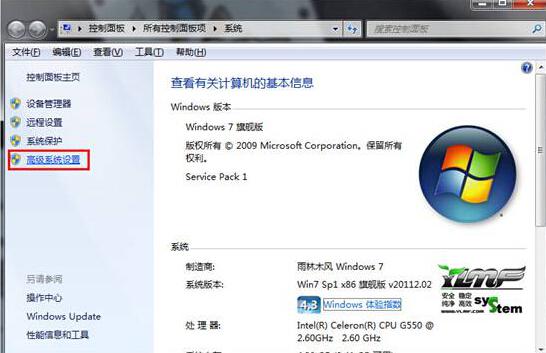
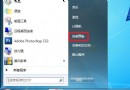
  1. 右鍵「電腦」→「內容」→ 左側「進階系統設定」。
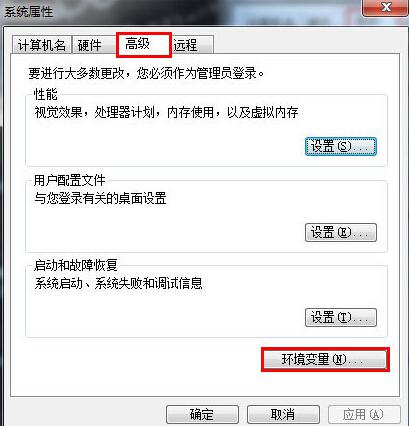
  2. 「進階」頁籤 → 「環境變數」。
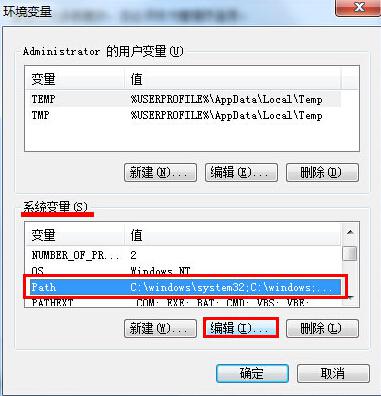
  3. 「系統變數」區找到 Path → 「編輯」。
  4. 在「變數值」最前或最後加入(以分號分隔):
    %SystemRoot%\system32;%SystemRoot%;%SystemRoot%\System32\Wbem;%SYSTEMROOT%\System32\WindowsPowerShell\v1.0
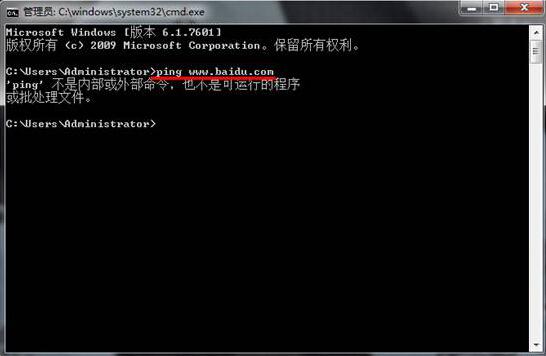
  5. 確定所有視窗 → 重新開啟 CMD 測試。
CMD指令失效
進階系統設定
環境變數編輯Path
Path正確數值

注意:編輯 Path 時勿刪除原有路徑,僅補上遺失的系統路徑。若不確定,可參考同版本正常電腦的 Path 內容複製過來。

Copyright © Windows教程網 All Rights Reserved