Win7 控制面板"操作中心"打不开/报错,通常是 Security Center 服务被禁用/停止。服务管理器启用即可恢复。
services.msc 打开服务。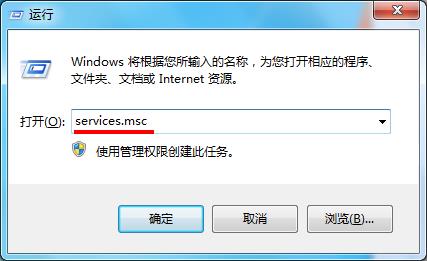
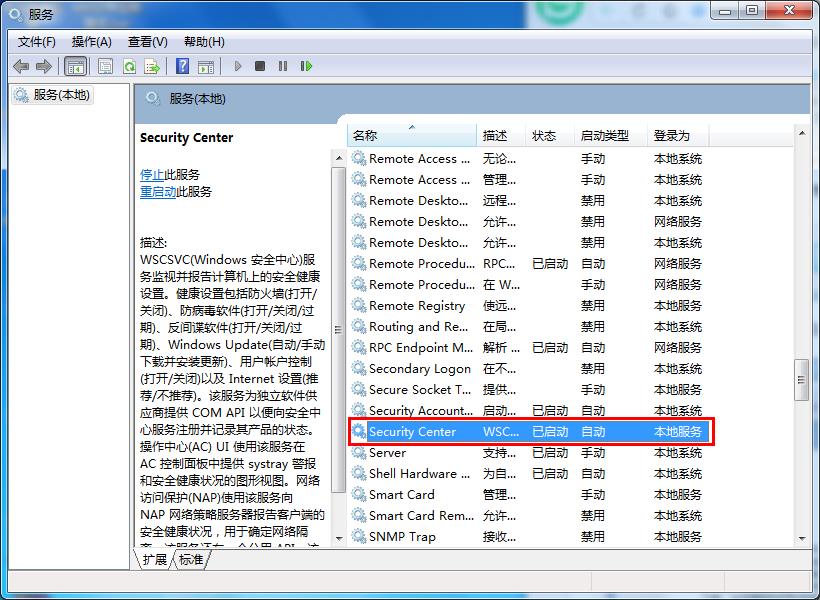
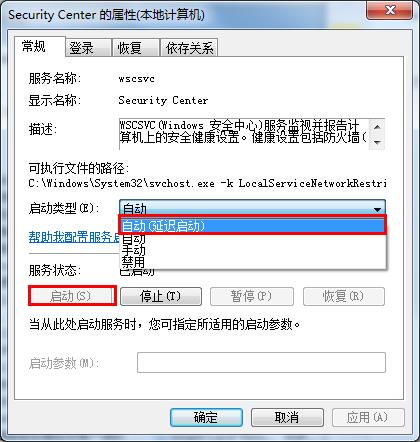
关联服务: 若仍异常,检查 Windows Security Center 依赖的 Remote Procedure Call (RPC)、Windows Management Instrumentation 服务是否运行中。
Win7 開機密碼忘記怎麼辦?U盤啟動碟清除密碼/BIOS 密碼放電全攻略
Windows 7 七大神奇功能體驗:視窗操作、縮圖預覽、菜單搜尋、家庭群組、動作中心、幻燈片、媒體中心
Adobe Audition (Au) 錄製電腦內部聲音完整教學:立體聲混音、WASAPI、虛擬聲卡三大法
Win7 寬帶撥號連線失敗錯誤 1717:啟動 Windows Event Log 服務即可解決
無法重裝系統提示「不是 Windows 而是 Windows.x」 完整 USB 重灌教學
Win7 網路診斷提示「診斷原則服務未執行」?啟動 Diagnostic Policy Service 及兩個 Host 服務即可