現象:點擊 IE 圖示,視窗閃現瞬間關閉,無法瀏覽網頁。
原因:actxprxy.dll (ActiveX Proxy DLL) 檔案遺失、損壞或註冊失效,導致 IE 核心元件無法載入。
修復指令
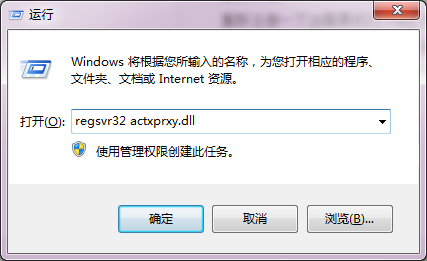
- Win+R 開啟「執行」。
- 輸入:
regsvr32 actxprxy.dll 按 Enter。
- 彈出「DllRegisterServer in actxprxy.dll succeeded」對話框表示成功。
- 重新開啟 IE 測試。
若仍無效:進階修復
- 以系統管理員身分執行 CMD,依序執行:
regsvr32 /u actxprxy.dll (解除註冊)
regsvr32 actxprxy.dll (重新註冊)
- 系統檔案檢查:
sfc /scannow 修復系統檔。
- 重設 IE 設定:控制台 → 網際網路選項 → 進階 → 「重設」。
- 若為惡意軟體破壞,需先全盤掃毒再修復。