msfeedssync.exe 是 IE7/8/9 的 RSS 訂閱同步程式,依排程自動執行更新訂閱內容。不使用 IE RSS 功能者可關閉以釋放資源。
關閉方法
- 開啟 IE →「工具」→「網際網路選項」→「內容」標籤。
- 「摘要與 Web Slice」區塊按「設定」。
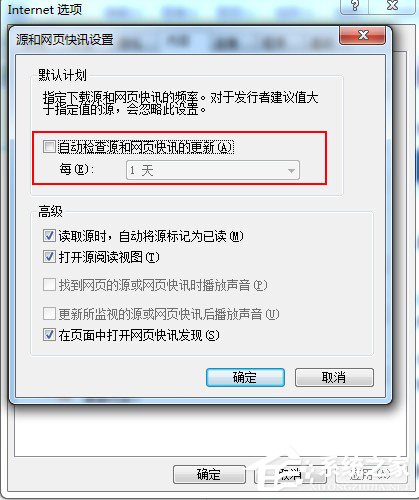
- 取消勾選「自動檢查摘要與 Web Slice 的更新」→ 確定。
進階:工作排程器停用任務
- Win+R
taskschd.msc →「工作排程器程式庫」→ Microsoft\Windows\FeedSynchronization。
- 右鍵 FeedSynchronization →「停用」。
影響範圍
- IE 內建 RSS 訂閱將不再自動更新。
- 不影響 Chrome/Firefox/Outlook 等其他應用程式的 RSS 功能。
- 系統資源佔用極低(約 1~2 MB 記憶體),關閉效益有限,視個人需求決定。