Windows XP Windows 7 Windows 2003 Windows Vista Windows 綜合教學 Linux 系統教學
Windows 10 Windows 8 Windows 2008 Windows NT Windows Server 電腦軟體教學

Win7 旗艦版 Winmgmt.exe 錯誤怎麼辦?重建 WMI 儲存庫修復

編輯:Win7 系統應用技巧

Windows 7 出現 Winmgmt.exe 錯誤(Windows Management Instrumentation 服務異常),會導致系統資訊查詢、軟體安裝、事件檢視器等功能失效。重建 WMI 儲存庫可徹底修復。

修復步驟

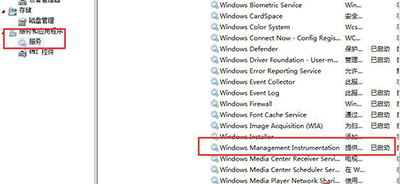
  1. 右鍵「電腦」→「管理」→「服務與應用程式」→「服務」。
  2. 找到 Windows Management Instrumentation,右鍵選擇「停止」。
  3. 開啟檔案總管,進入路徑:
    C:\Windows\System32\wbem\Repository
    刪除該資料夾內 所有檔案與子資料夾。
  4. 回到服務管理員,右鍵 Windows Management Instrumentation 選擇「啟動」。
  5. 服務重新啟動時,會自動根據註冊表 HKEY_LOCAL_MACHINE\SOFTWARE\Microsoft\WBEM\CIMOM\Autorecover MOFs 重建儲存庫檔案。
修復完成後,WMI 相關功能應恢復正常。若仍有問題,可嘗試執行 winmgmt /resetrepository 指令(需管理員權限)。

Copyright © Windows教程網 All Rights Reserved