Windows XP Windows 7 Windows 2003 Windows Vista Windows 綜合教學 Linux 系統教學
Windows 10 Windows 8 Windows 2008 Windows NT Windows Server 電腦軟體教學

Win7 如何查看網速與測試網路連線?CMD ping 指令教學

編輯:Win7 系統應用技巧

Windows 7 內建 ping 指令可快速測試網路連通品質、延遲(Ping 值)與封包遺失率,無需安裝第三方軟體。

操作步驟

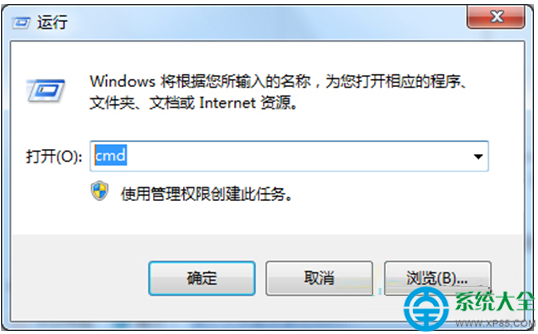
  1. 按 Win + R 輸入 cmd 開啟命令提示字元。
  2. 測試區域網路/閘道連通:
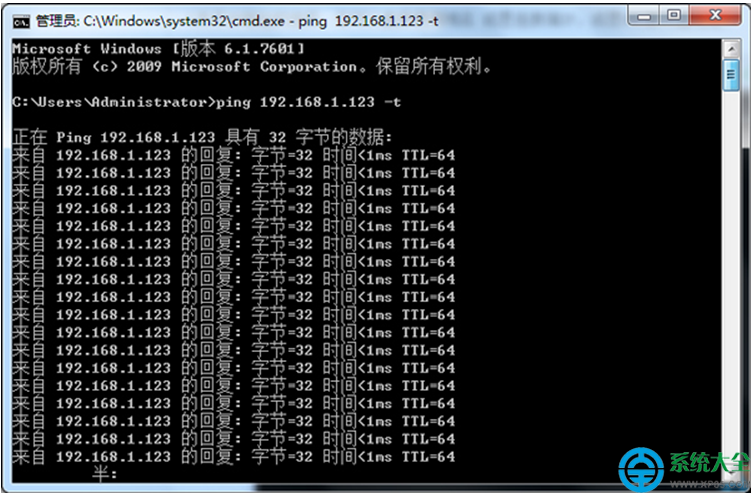
    輸入 ping 192.168.1.1 -t(將 IP 換成您的路由器閘道 IP),觀察回應時間。
    -t 參數持續發送,按 Ctrl + C 停止。
  3. 測試外網速度/延遲:
    輸入 ping www.google.com -t 或 ping 8.8.8.8 -t,觀察 time=XXms 數值。
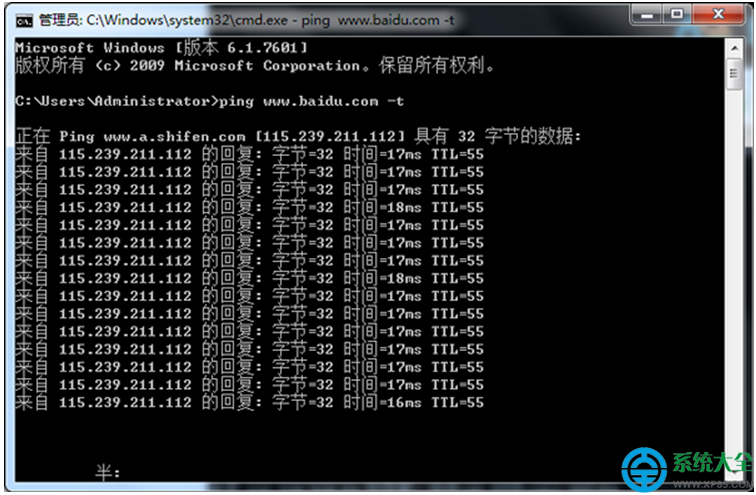
    time 越小越好(<30ms 極佳,30-80ms 良好,>150ms 明顯延遲)。
  4. 判斷網路故障:
    出現 Request timed out(逾時)或 General failure 表示連線中斷,請檢查網路線、路由器、ISP 狀態。

進階: 加上 -n 10 限定發送 10 次封包(ping 8.8.8.8 -n 10),避免持續佔用頻寬。

Copyright © Windows教程網 All Rights Reserved