360 重裝失敗常見原因
- 網絡/伺服器/驅動/分區/啟動修復任一環節失敗。
- 舊筆記本硬體/BIOS 與 360 重裝邏輯不兼容。
最靠譜方案:U盤 PE 手動安裝純淨版 Windows
- 另一台電腦:下載 **微 PE / Ventoy** + **Windows 7/10 官方 ISO**(MSDN/I tell you/itellyou.cn)。
- 寫入 8GB+ U盤(Ventoy 只需拷貝 ISO,免格式化)。
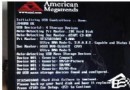
- 故障機插 U盤 → 開機連點 F2/F10/F12 → 選 U盤 UEFI/Legacy 啟動。
- 進 PE → 可選:備份數據 → DiskGenius 重分區(建議 GPT/UEFI) → CGI/WinNTSetup 安裝 Windows → 重啟進系統 → 裝驅動(360驅動大師/官網)。
不想折騰
找懂行朋友/維修店(¥50-100)代勞,**備份重要數據**是前提。