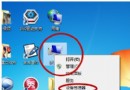
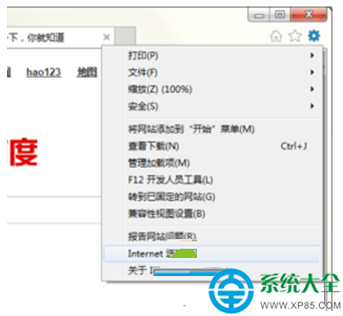
Web 伺服器(WWW 服務)用於發布網站。IIS 不預設安裝,需手動加入 Windows 元件。以下為 Server 2003 環境下的安裝流程。
IIS 安裝步驟
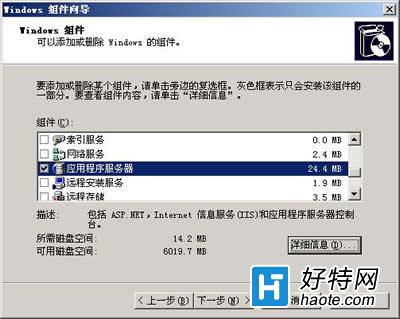
- 控制台 → 「新增/移除程式」 → 「新增/移除 Windows 元件」。
- 勾選「應用程式伺服器」 → 「詳細資料」。
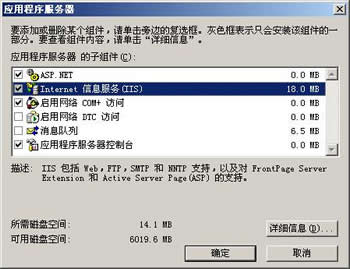
- 必選:「Internet Information Services (IIS)」、「應用程式伺服器主控台」。
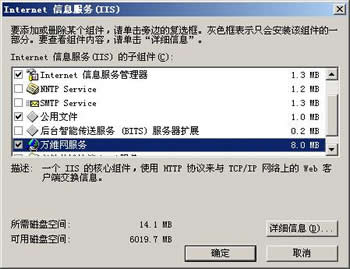
- IIS 詳細資料 → 勾選「Internet Information Services 管理員」、「World Wide Web Service」。
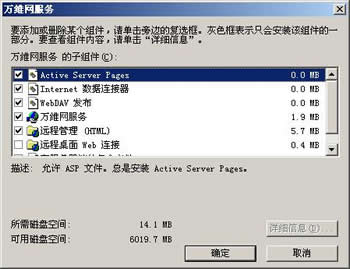
- WWW Service 詳細資料 → 必選「World Wide Web Service」;若需支援 ASP 另勾「Active Server Pages」。
- 一路確定 → 下一步 → 系統複製檔案(可能需插入安裝光碟) → 完成。
安裝完成後,可在「系統管理工具」開啟「Internet Information Services (IIS) 管理員」建立網站、設定虛擬目錄、權限等進階配置。網頁檔案需由維護人員上傳至對應實體路徑。