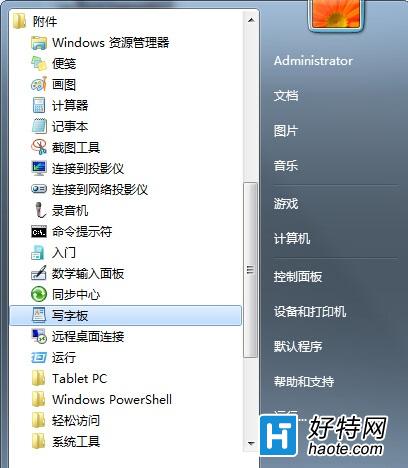
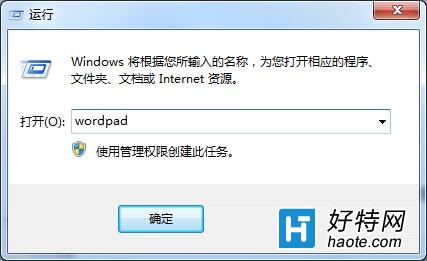
WordPad 是 Windows 內建的輕量級文書處理工具,開啟方式有二:
「開始」→「所有程式」→「附屬應用程式」→「寫字板」。
按 Win + R 輸入 wordpad 按 Enter 即可直接啟動。
wordpad
方法二最快速,適合常用使用者記住指令隨時呼叫。
Surface Pro 4 睡眠喚醒失敗?三招強制喚醒 + 根治設定
Win7 無法上網提示「找不到調變解調器」完整排查與修復指南
Windows XP 無法直接升級 Windows 7:必須全新安裝或雙系統
WinXP 系統優化加速三絕技:關閉開機磁碟掃描等待、刪除系統備份檔、取消 ZIP 資料夾功能
Win 7 更新後不斷提示重開機?群組原則關閉自動重啟,同 ID 65018 方案
修改 Win7 資源管理器預設開啟路徑:從「程式庫」改為「電腦/磁碟機」一招搞定
Win7 玩 DNF 卡畫面/卡頓不掉線?虛擬記憶體調大 + 相容模式雙管齊下
Win7 英文版無法啟動魔獸世界?修改登錄表語言鍵值為中文 (0804) 解決