Windows XP Windows 7 Windows 2003 Windows Vista Windows 綜合教學 Linux 系統教學
Windows 10 Windows 8 Windows 2008 Windows NT Windows Server 電腦軟體教學

Win7 開機桌面圖示載入緩慢?調大圖示快取上限加速顯示

編輯:Win7 系統應用技巧

Win7 開機後桌面圖示逐個彈出、載入緩慢,主因是圖示快取上限 Max Cached Icons 預設值過小(預設 500),導致圖示頻繁重繪。將上限調至最大值 8192 可顯著加速圖示顯示。

修改步驟

步驟 1:開啟登錄編輯器

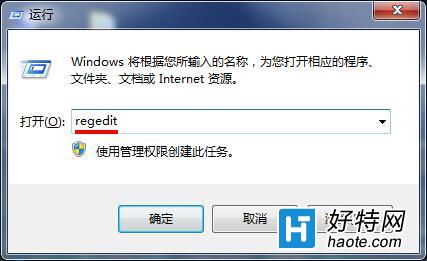
Win + R → regedit → Enter。

執行regedit

步驟 2:導航至 Explorer 鍵值

依序展開:HKEY_LOCAL_MACHINE\SOFTWARE\Microsoft\Windows\CurrentVersion\Explorer
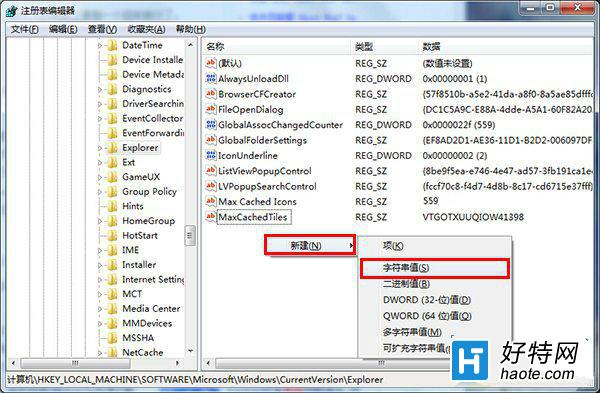
Explorer鍵值位置

步驟 3:新增/修改 Max Cached Icons 字串值

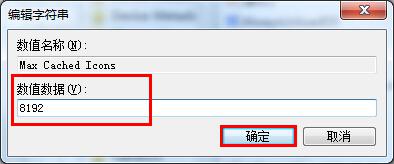
右側找 Max Cached Icons(無則右鍵空白處 → 新增 → 字串值 → 命名) → 雙擊修改數值資料為 8192(最大支援值) → 確定。
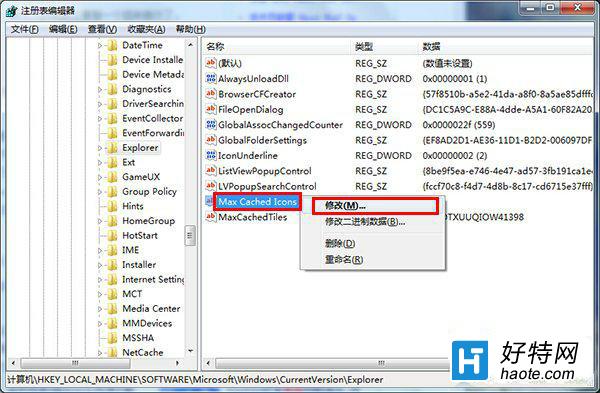
修改Max Cached Icons

設定數值8192

生效與補充

  • 重新開機或重啟 explorer.exe 後生效。
  • 此值控制記憶體中圖示快取大小,調大佔用微量記憶體(約數 MB),現代電腦無負擔。
  • 若圖示仍異常,嘗試刪除 %LocalAppData%\IconCache.db 重建快取。
Copyright © Windows教程網 All Rights Reserved