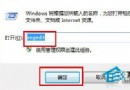
Windows 7 工作列日期預設不顯示星期,但可透過「地區與語言」設定輕鬆加上:
yyyy-M-d dddd
yyyy'年'M'月'd'日' dddd
此法適用於所有 Windows 版本,無需修改登錄檔或安裝第三方工具。若習慣用小工具或點選時間查看星期,亦可保持預設。
Windows 7 桌面側邊欄與快速啟動列客製化:移除隱藏側邊欄、應用程式控制原則、啟用快速啟動
Win7 遺失 Msvcr110.dll 怎麼辦?安裝 Visual C++ 2012 可轉散發套件修復
Win7 桌面圖示不見了?一鍵找回電腦、回收站、網路、控制台
Win7 無法關機?病毒掃描、註冊表修復、群組原則、關機音效四大排查法
Win7 手動建立寬頻撥號連線與桌面捷徑完整教學
Win7 無法存取工作群組電腦?啟用 Guest 與安全性原則設定
Win7打開文件提示「Windows不能打開此文件」怎麼解決?注冊表修復文件關聯
Win7 垃圾檔案大掃除:資料夾與登錄表雙管齊下