Windows XP Windows 7 Windows 2003 Windows Vista Windows 綜合教學 Linux 系統教學
Windows 10 Windows 8 Windows 2008 Windows NT Windows Server 電腦軟體教學

Win7 移除 PNG 縮圖陰影效果:登錄檔 Treatment 值改為 0 即可

編輯:Win7 系統應用技巧

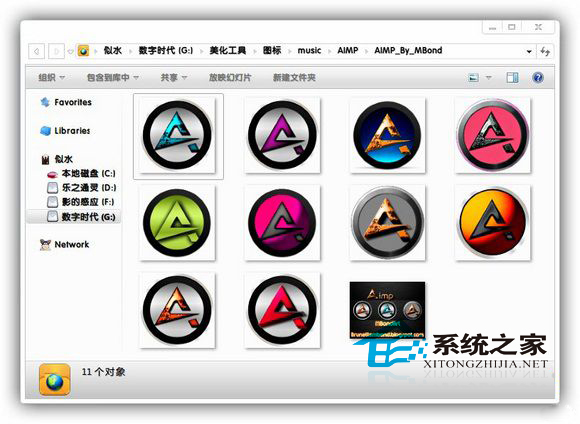
Win7 PNG 檔案縮圖預設帶有陰影邊框,若偏好平面顯示可透過登錄檔移除:

移除步驟

  1. 按 Win + R 輸入 regedit 開啟登錄檔編輯器。
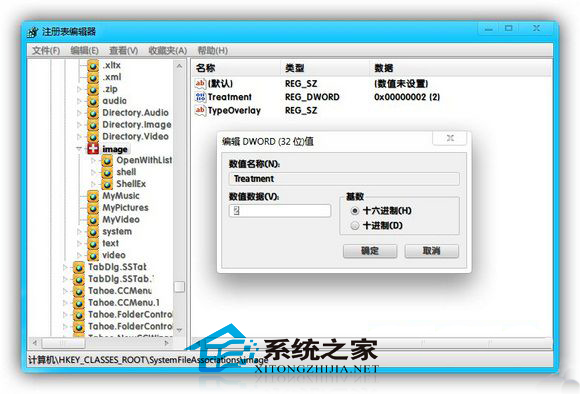
  2. 定位至:HKEY_CLASSES_ROOT\SystemFileAssociations\image。
  3. 右側找到 Treatment 字串值,雙擊將數值資料從 1 改為 0。
  4. 確定儲存,重新整理資料夾(F5)或重開機,PNG 縮圖陰影即消失。

PNG 縮圖陰影效果示意

登錄檔 Treatment 值改為 0

補充: 此設定影響所有影像檔案類型(.jpg、.png、.bmp 等)的縮圖陰影。若僅針對 PNG,需建立 HKEY_CLASSES_ROOT\SystemFileAssociations\.png 子鍵並新增 Treatment=0,但通常系統以 image 統一處理。

Copyright © Windows教程網 All Rights Reserved