從 Windows XP 使用 Ghost 硬碟安裝器 (如 OneKey Ghost、NT6 HDD Installer) 安裝 Windows 7 時,重開機出現 Cannot find hyldr in all drives. Press Ctrl+Alt+Del to restart。這是**啟動載入器 (hyldr/bootmgr) 未正確寫入目標分區、或安裝器版本不支援當前硬體/分區結構**導致。
diskpart → list disk → select disk X → list partition → select partition Y (目標分區) → active (設為作用中)。bootsect /nt60 SYS /mbr (寫入 Win7 啟動代碼至 MBR)。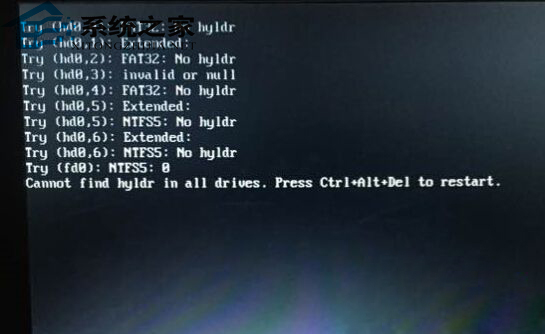
**放棄在 XP 下用 Ghost 硬碟安裝 Win7**,這是 2010 年前的過時做法。**直接用 Rufus/Ventoy 製作官方安裝 USB 重裝**,乾淨、穩定、支援完整驅動、4K 對齊、UEFI/BIOS 雙模。若電腦極舊不支援 USB 開機,才考慮 WinNTSetup 硬碟安裝。
遇到 "Cannot find hyldr",**換新版安裝工具或改用 USB 安裝**,別在舊工具上浪費時間。
Win7 如何關閉 Adaptive Brightness 服務省記憶體?服務管理員停用 SensrSvc
Win7 取得 TrustedInstaller 權限修改/刪除系統檔案完整教學
Win7 開機不顯示桌面圖示/工作列?重啟 explorer.exe 或安全模式殺毒雙軌修復
Win7 按鍵盤 U 鍵彈出「輕鬆存取」?Win 鍵卡住/硬體故障排查指南
Win7 網速慢?匯入註冊表優化 TCP/IP 參數提升傳輸效能
Windows 7 開機黑畫面錯誤「Windows 無法啟動:\Windows\System32\Config\System」修復教學