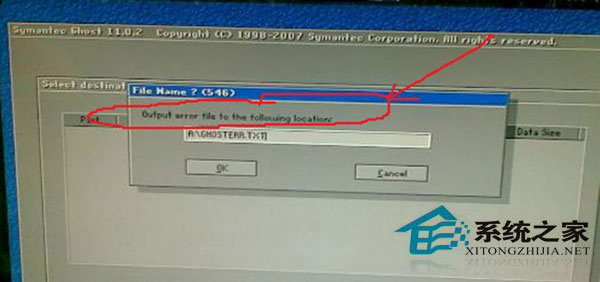
Ghost 還原映像檔時出現 output error file to the following location,常見五大原因及解決方案:
output error file to the following location
.GHO
FDISK /MBR
FORMAT C:
依情況逐一排查,通常能解決 Ghost 還原失敗問題。
Win7 開機黑屏僅顯示滑鼠游標:六大排查方案從輕到重
Win7網路加速註冊表優化:修改GlobalMaxTcpWindowSize提升吞吐量
Win7 網路閒置 20 分鐘自動斷線?電源計畫高效能 + 寬頻連線屬性調整
硬碟安裝 Win7 第一步:預先安裝「絕對 PE 工具箱」建立救援環境
Steam 購買遊戲綁定帳號非裝置,換電腦登入即可遊玩
電源故障硬扛不換?小心燒毀全機硬體,後果你負擔不起!
Win7 「網上鄰居」在哪?三種快速開啟「網路」資料夾方法
Windows 7 建立密碼重設磁碟:隨身碟一鍵製作,忘記密碼也能輕鬆重設