Windows XP Windows 7 Windows 2003 Windows Vista Windows 綜合教學 Linux 系統教學
Windows 10 Windows 8 Windows 2008 Windows NT Windows Server 電腦軟體教學

Win7 啟動 WLAN AutoConfig 服務失敗錯誤 1068 的登錄檔修復法

編輯:Win7 系統應用技巧

啟動「WLAN AutoConfig」服務 (無線網路連線必要服務) 時出現錯誤 1068 (相依服務無法啟動),常因過度優化導致相依服務 Ndisuio 登錄值遺失或停用。
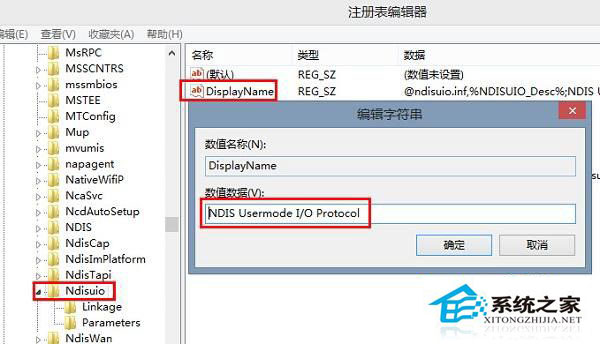
錯誤 1068 視窗

修復步驟

  1. 開啟登錄編輯器 (regedit),展開至:
    HKEY_LOCAL_MACHINE \ SYSTEM \ CurrentControlSet \ services \ Ndisuio
  2. 檢查右側是否有 DisplayName 字串值 = NDIS Usermode I/O Protocol,若無則新增字串值並設定。
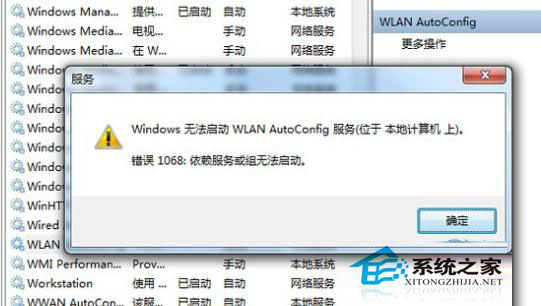
  3. Ndisuio 登錄值
  4. 雙擊 Start 值 (DWORD),將數值資料改為 2 (自動),若無則新增 DWORD 值名為 Start 值為 2。
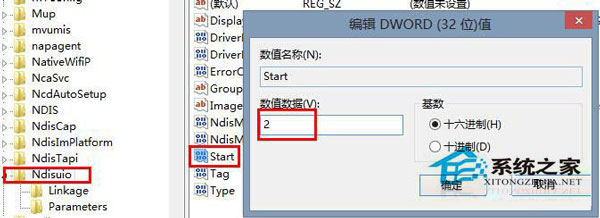
  5. 修改 Start 值為 2
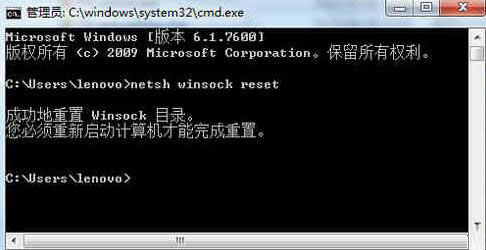
  6. 開啟命令提示字元 (系統管理員),執行 netsh winsock reset 重設 Winsock 目錄。
  7. netsh winsock reset 執行結果
  8. 重新開機,WLAN AutoConfig 服務即可正常啟動,無線網路恢復連線。

此問題常由優化軟體誤停用相依服務引起,修復登錄值並重設 Winsock 為標準解法。

Copyright © Windows教程網 All Rights Reserved