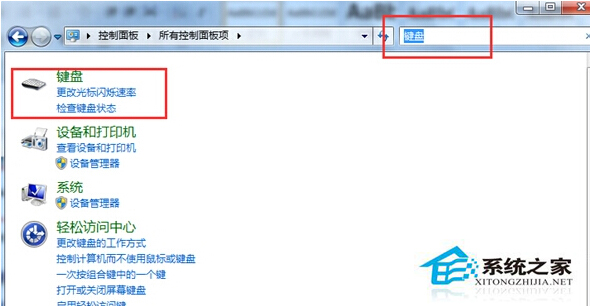
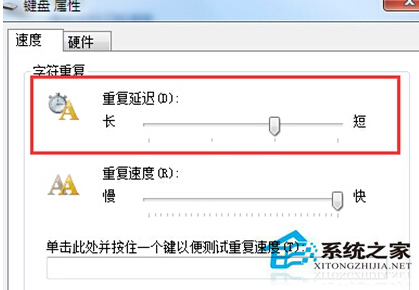
按鍵一次卻出現多個相同字元,鍵盤硬體正常時多為「字元重複延遲」設定過短。控制台 → 鍵盤 → 「速度」頁籤 → 拉長「字元重複延遲」滑桿,減少誤判重複輸入。
若仍重複,再進一步拉長延遲或檢查鍵盤硬體彈簧疲乏。
電腦頻繁崩潰怎麼辦?藍屏、黑屏、無法開機分類解決方案
Win7 如何封鎖不良網站?修改 Hosts 檔案導向 127.0.0.1 實現免費過濾
Win7 硬碟指示燈常亮不熄滅?三大原因與對應解決方案
Win10 14986 版本休眠喚醒失敗、黑屏無反應?關閉快速啟動、重置電源方案、強制重啟三步走
Win7 開關機藍畫面 BCCode 3b 解決:win32k.sys/ntoskrnl.exe 驅動修復、最後正確配置、檔案替換
Win+Tab 體驗 Windows 7 炫酷 3D 視窗切換
Win7 英文版任務列語言列不見了?圖文教你找回輸入法圖示
Win7 批次重新命名檔案(自動編號)技巧