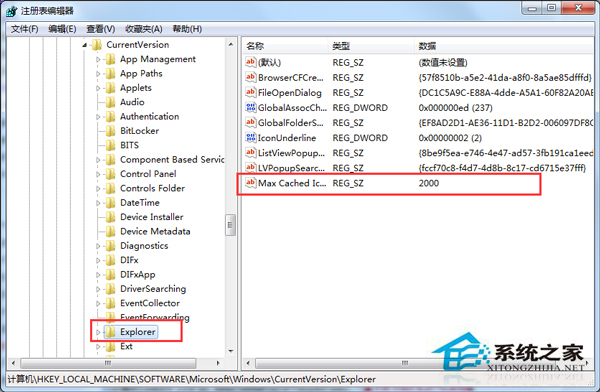
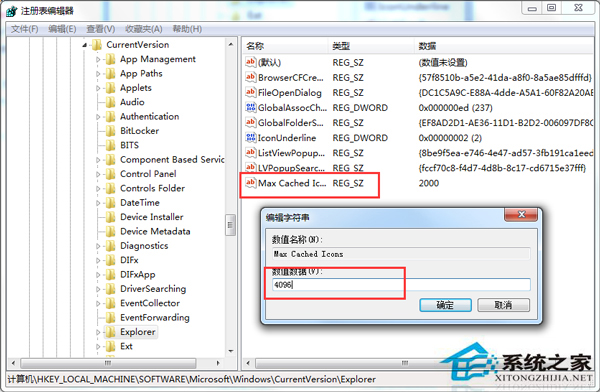
桌面圖示隨時間增多,按 F5 重新整理會明顯延遲。將註冊表 Max Cached Icons 數值調大至 4096(4 MB),可擴大圖示快取空間,大幅提升重新整理速度。
Max Cached Icons
4096
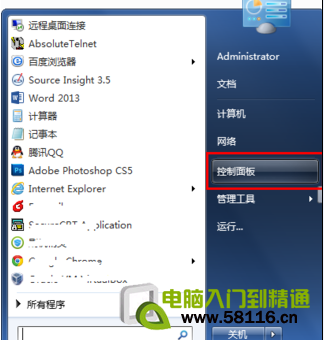
regedit
HKEY_LOCAL_MACHINE\SOFTWARE\Microsoft\Windows\CurrentVersion\Explorer
搭配定期清理桌面垃圾檔案,效果更佳。
Win7 在 exFAT 格式磁碟無法寫入檔案?執行 chkdsk 修復檔案系統錯誤
Windows 7 遊戲無法全螢幕?登錄檔 Scaling=3 通殺方案
Windows 7 跳躍清單管理:置頂固定項目、停用隱私追蹤、清理雜亂圖示
怎麼看電腦是什麼系統?三種最快方法教你識別 Windows 版本
Win7 關閉/開啟 Windows 防火牆圖文教學
Win7查看系統位數(32位/64位)兩大經典方法
Windows 7 硬碟空間需求實測:安裝佔用 7GB、建議預留 15GB 以上
直播《英雄聯盟》還想多開玩其他遊戲?CPU 核心數與記憶體是關鍵