Windows XP Windows 7 Windows 2003 Windows Vista Windows 綜合教學 Linux 系統教學
Windows 10 Windows 8 Windows 2008 Windows NT Windows Server 電腦軟體教學

Win7 開機黑屏錯誤 error 15: file not found 的修復方案

編輯:Win7 系統應用技巧

開機出現 GRUB 錯誤 error 15: file not found,通常是開機載入器設定錯誤或磁碟分區表損壞。可嘗試在 GRUB 命令列手動指定核心與 initrd 路徑啟動,或使用磁碟工具修復主開機記錄 (MBR)。
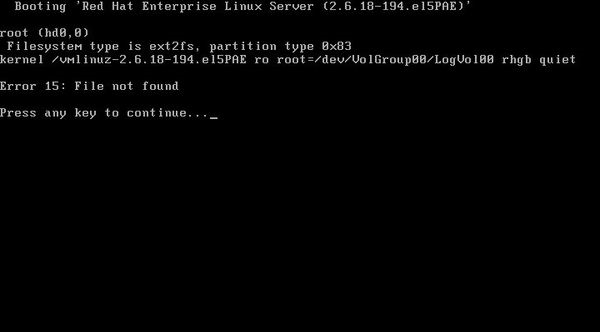
GRUB error 15 畫面

方法一:GRUB 命令列手動啟動

  1. 錯誤畫面按任意鍵進入 GRUB 選單,按 C 進入命令列。
  2. 輸入 root (hd0,0) 指定開機分區 (依實際分區調整)。
  3. 輸入 kernel (hd0,0)/boot/ 後按 Tab 列出可用核心,補全核心檔名並加參數,例如:
    kernel (hd0,0)/boot/vmlinuz-2.6.9-42.ELsmp ro root=LABEL=/ vga=0x317
  4. 輸入 initrd (hd0,0)/boot/initrd-2.6.9-42.ELsmp.img 指定 initrd 檔。
  5. 輸入 boot 啟動系統。

方法二:使用 DiskGenius 修復 MBR

  1. 準備啟動 U 盤 (含 DiskGenius)。
  2. 從 U 盤啟動進入 DiskGenius。
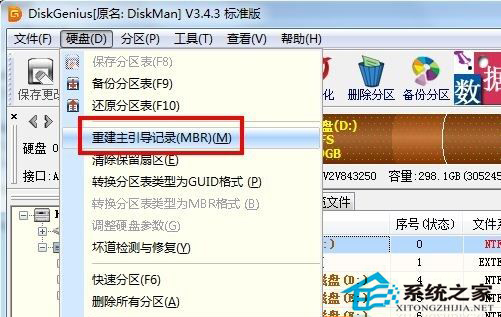
  3. 選中系統磁碟,點選「硬碟」→「重建主開機記錄 (MBR)」。
  4. DiskGenius 重建 MBR

上述任一方法通常能解決 error 15 問題,若仍無法啟動請考慮重裝系統。

Copyright © Windows教程網 All Rights Reserved